AUCTRIA ACADEMY
F.A.Q.
Getting Started
Popular Pages
Auctria Dashboard
  • Getting Started
    • First Steps
    • Plan
    • Run
    • Close
      • Email Participants With A Balance
      • Re-Open Unsold Items
    • Auctria Costs
    • Popular Pages
    • Glossary
    • Resources
  • Core Features
  • Event
    • Add A New Event
    • Change Events
    • Copy Event
    • Archive Event
    • Event Details
    • Event Permissions
    • Health Checks
    • Connectivity
    • Create An Online Store
    • Custom Questions
    • Event With Tickets
    • In-Person Events
    • Set Up A Donation Only Event
    • Set Up An In-Person Event
    • Set Up An Online Event
    • Terminology
  • Event Dashboards
    • Default Dashboard
    • Income Summary
    • Item Summary
    • Your Profile
      • Access My Profile
  • Credit Cards
    • Allow Fees Per Participant
    • Credit Card How-To Guides
      • Connect Stripe Account
      • Create Online Payment Link
      • Make cc.fees Tax Deductible
      • Require ReCaptcha Validation
      • Change Test Mode
      • Connect A Mobile Card Reader
      • Check Total Credit Card Fees
      • Test & Live Modes
      • Credit Card Partial Refunds
      • Credit Card Full Refunds
      • Registered Cards
      • Registered Credit Cards
      • Remove All Registered Cards
    • Reference Materials
      • Credit Card Settings
      • Credit Card Reports
    • Payment Processors
    • Payment Processor Accounts
    • Stripe
      • Export Stripe Data
      • Stripe Readiness Review
    • Authorize.Net
      • Configuration
      • Fraud Detection
      • Card Registration
      • Card Code Required
      • AVS Mismatch
      • Authorize.Net Readiness Review
    • Processing Fees
    • Credit Card Costs
    • Readers And Swipers
      • Standalone Card Readers
    • Registered Cards
  • Auctions
    • Online Auctions
      • Participants In Online Events
    • Paper Auctions
    • Live Auctions
    • Online Bidding
    • Kiosk Mode Bidding Setup
      • Slide Shows
      • Mobile Device Locking
    • Monitor Auction
  • Participants
    • How-To Guides
      • Open Participant Details
      • Copy Participants
      • Link Participants
      • Unlink Participants
      • Merge Participants
      • Correct Email Typos
      • Turn Off Participant Numbers
      • Duplicate Participant
      • Sharing Participant Numbers
    • Reference Materials
      • Participant Details
      • Add New Participant
      • Participant Numbering
      • Participant Maintenance
        • Duplicate Emails
        • Duplicate Names
        • Link Participants
        • Multiple Tickets
      • Registration/Checkout
      • Statements
        • Email Statements
        • Printed Statements
        • Text Statements
      • Choose Participants Filters
    • Catering
    • Linking vs Merging
    • Participant Numbers
  • Communication
    • Email
      • Custom Emails
      • Editing Emails
        • Email Element Visibility
        • Email Safe Fonts
      • Email Manager
      • System Emails
        • System Emails Summary
        • System Email Options
    • Email How To Guides
      • Email Ticket Holders
      • Use Conditional Content
      • Send Custom Emails
      • Add Table References
      • Customize Email Footer
      • Customize Email Header
      • Email Edits For Online Auctions
      • Email Text Link
      • Review Duplicate Emails
    • Text Messages
      • Text Settings
      • Text Options
      • Advanced Texting Profile
    • Texting How To Guides
      • Participants & Phone Numbers
      • Send Custom Text
      • Set Up Advanced Texting
      • Text-To-Give
      • Transfer Text Number
    • System Notifications
    • Transactional vs Marketing Emails
    • Mobile Notifications
    • Standard And Advanced Texting
    • Ticket Sales Communication
    • Reference Materials
      • A2P 10DLC
      • Add Block
  • Items
    • Add New Items
      • Copy Items
      • Duplicate Items
      • Delete Item
      • Export Items
      • Batch Image Upload
      • Define A Gift Certificate
      • Add A Scheduled Event Item
      • Open Multiple Quantity Items
    • Item Details
      • Open Item Details
      • Edit Item Details
      • Open Item Bidding
      • Summary
        • Donation Items Detailed
        • For Sale Items Detailed
        • Live Bidding Type
        • Online Bidding Type
        • Paper Bidding Type
        • Partial Items Detailed
        • Raffle Prize Items Detailed
      • Images and Links
      • Contents
      • Activity
      • History
    • Item Types
      • Paper Bidding Type
      • Live Bidding Type
      • Online Bidding Type
      • Partial Items
      • For Sale Items
      • Donation Items
      • Raffle Prize Items
      • Buy It Now Only Items
    • Item Maintenance
      • Hide Items
      • Multiple Winners
        • Winning Multiples
      • Change Donation Item
      • Track Paddle Raise Donations
      • After Event Sales
      • Coupon Codes
      • Fund-A-Need
      • Online Pre-Bidding
      • Peer To Peer
        Peer-to-Peer Style Fundraising in Auctria
        🧩 How It Works
        📌 Example Setup (Generalized)
        💡 Tips & Ideas
      • Pricing Examples
      • Taxable Value
      • Auctria Voting
    • Item Numbering
      • Bulk Renumbering
      • Drag And Drop Ordering
      • Live Auction Ordering
      • Random Shuffle
      • Bulk Renumbering
      • Set Next Item Number
    • Basket And Packages
      • Build Baskets
      • Set Basket Descriptions
      • Basket Value
      • Combine For Sale Items
      • Combine Partial Lot Items
    • Reference Materials
      • Choose Items Filters
      • Choose Items Sort
      • Open/Close Bidding
      • Pricing Policy
      • Shipping
      • Sales Tax
        • Sales Tax Mode
  • Financials
    • Expenses
      • Add A New Expense
      • Edit Expenses
      • Add Expense Category
      • Add Category to Expense
    • Consignments
    • Reference Materials
  • Raffles
    • Creating Raffles
    • Running Raffles
    • How-To Guides
  • Tickets
    • Ticket Management
      • Add Or Edit Tickets
        • Add Early Bird Tickets
        • Add Multi-Day Tickets
      • Changing Tickets
      • Activate/Deactivate Tickets
      • Transfer Tickets
      • Repair/Reissue Tickets
      • Tables And Seating
        • Assign Seating
      • Meal Choices
      • E-Tickets
        • Preview E-Ticket
        • Ticket Styling
      • Ticket Claim
      • Ticket Statements
      • Ticket Details
      • Ticket Settings
    • Ticket Sales
      • Sell Tickets
      • Sell Free/Discount Tickets
      • Stop Selling Tickets
      • Managing Ticket Sales
      • Refund Tickets
    • How-To Guides
  • Sponsorships
    • Add & Sell Sponsorships
      • Sell Sponsorships
    • Displaying Sponsors
  • Reports
    • Report Configuration
      • Change Report Views
      • Selecting By Tags
      • Drop-Down Selectors
      • Choosing Columns
    • Bulk Editing/Mass Changes
      • Bulk Editing
      • Delete Multiple Records
      • Bulk Edit Tags
      • Change Sales Tax Categories
    • Reference Materials
      • Item Reports
      • Donor Reports
      • Participant Reports
      • Ticket And Sponsorships Reports
      • Financial Reports
      • Other Reports
      • Raffles Reports
  • Actions
  • Check-In
    • Check-In By Organizer
    • Check-In Settings
    • Self Check-In Request
    • Participant Access
  • Checkout
    • Checkout By Organizer
    • Batch Checkout
    • How-To Guides
      • Checkout And Payments
      • Delete Purchase With Payment
      • Add Shipping Costs Manually
      • Negative Payment Refund
      • Splitting Bids
      • Transfer Payments
    • Checkout Payment Options
    • Online Purchase Behavior
    • Record Payment
    • Transfer Payment
    • Delete Non-CC Payment
    • Give Event Credits
    • Handling Payments
    • Issuing Refunds
  • Bidding Dashboard
    • How-To Guides
      • Promote Or Demote Bids
      • Edit Bids
      • Remove In-Progress Bid
      • Remove Maximum Bid
    • Editing Transactions
    • Live Auction
    • Online Auction
    • Paper Auction
  • Donations Dashboard
    • Dessert Dash
    • Paddle Raise
    • Record Donation
  • Sales Dashboard
    • Add For Sale Item
    • Add New Sponsorship
    • Add New Ticket
  • Event Website
  • Online Experience
    • Event Website
      • Online Bidding
      • Buying Single Tickets
      • Buying Multiple Tickets
    • Participant Check In
    • My Account
      • Update Ticket Details
    • Placing Bids
      • Bid Extension For Bidders
      • Kiosk Mode Bidding
      • Multiple Winners
      • Text Bidding
    • Mobile Bidding
      • Bidder Mobile App
      • How Bidders Sign In
      • Sign Into A Different Event
    • Text Commands
    • Change Maximum Bid
    • Max Bidding Examples
    • Max Bidding Rules
    • Maximum Bidding
  • Website
    • How-To Guides
      • Create New Event Website
      • Set The Website Address
      • Configure Menu Entries
      • Fix Page Content
      • Get QR Code
      • Copy Website With Import/Export
      • Track Visitors
    • Customization How-Tos
      • Set Home Page
      • Website Page Layout
      • Hide Website Pages
      • Edit Columns
      • Add New Page
      • Add New Row
      • Add Section
      • Add A Donation Page
      • Add A Sponsor Page
      • Create Coming Soon Page
      • Save The Date Page
    • Element How-Tos
      • Move Elements
      • Configure Item Catalog Style
      • Change Catalog Button Colors
      • Configure Items Displayed
      • Item Catalog Custom Cards
      • Display Donation Items
      • Add Button
      • Clickable Images
      • Modify Bidder Registration Form
      • Customize Shopping Cart
      • Add Cash Donations
      • Track Bidder Donations
      • Add A Pop-Up Video
    • Reference Materials
      • Website Dashboard
      • Header Links
      • Add Behavior
      • Add Style
        • Background
        • Fonts
        • Height
        • Margin And Padding
        • Text Align
        • Border
        • Thermometer
        • Custom Style
      • Choose File
      • Choose Image
      • Color Picker
      • Import Website
      • Export Website
  • Videos
  • Editor
    • Opening The Editor
    • Website Locked
    • Website Editor Sidebar
    • Website Editor Mode Effects
    • Manage Website Pages
      • System Pages
      • Special Pages
    • Current Page Settings
    • Theme Settings
      • Theme
      • Add Theme Color
      • Add Custom Variable
      • Add Font
    • Site Settings
    • Page Properties
      • Edit Current Section
      • Current Row
    • Preview Website Pages
    • Common Element Actions
    • Website Element Visibility
      • Date And Time View
  • Content
    • Row Content
      • Donation Element
      • Donor Catalog
      • Footer
      • Header
      • Item Catalog
      • Item Details
      • Leaderboard
      • Donate An Item
      • Sponsors Catalog
      • Sponsors Row
    • Column Content
      • Button
      • Callout
      • Content Cards
      • Countdown
      • Divider
      • Document Preview
      • Heading
      • Hero Element
      • Image
      • Image Carousel
      • Item Image Carousel
      • Map
      • Parallax Image
      • Profile Bar
      • Profile Cards
      • Progress Tracker
      • Quote
      • Share Event
      • Text Element
      • Video
    • Headers And Footers
  • Templates
  • Advanced Styling
    • Styling By Target
    • Styling by Code
  • Mobile Apps
  • Auctria Mobile Apps
  • Auctria Admin App
    • Admin App Bids & Donations
    • Admin App Check-In
    • Admin App Checkout
    • Admin App Sales
    • Charging A Credit Card
    • Mobile Card Readers
    • Pairing A Phone
    • Registering Credit Cards
    • Scan QR Codes
  • More Features
  • Settings
  • Online Settings
    • Online Availability
    • Online Bidding Times
    • How-To Guides
      • Online Pay Later
      • Reopen Online Bidding
      • Set Limited Ticket Times
      • Closing Online Bidding
      • Pause An Online Event
      • Set Up Online Pre-Bidding
      • Tracking Online Donations
    • Online Visibility
    • Timezones
  • Organizations
    • How-To Guides
      • Create Test Event
      • How To Replace A User
      • Change Contact Email
      • Adding Users
      • Edit Users
      • New Organization By Participant
      • Removing Users
    • Reference Materials
      • User Accounts
      • Auctria License
      • Auctria Balance
      • Tag Maintenance
      • Filters
    • Standalone Card Readers
    • Upgrade License
    • User Permissions
  • Categories
    • Item Categories
      • Add New Category
      • Grouping Items By Category
    • Expense Categories
    • Sales Tax Categories
    • Consignment Categories
      • Add Consignment Categories
    • Edit Categories
    • Ordering Categories
  • Item Donors
    • Add In-Kind Donation
    • Add Item Donor
    • Item Donors Dashboard
      • Item Donor Details
      • Donor Receipts
      • Donor Maintenance
    • Solicited Items
    • Solicited Items Settings
  • Printing
    • How-To Guides
      • Pre-Populate Bid Sheet Values
      • Print Quantity On Bid Sheets
      • Defining Bid Sheet Columns
      • Customize Bid Sheets
      • Generate Thank You Letters
      • Fix Blank Pages
      • Word Documents
      • Print Participant Paddles
      • Print Bid Sheets 2 Up
      • Print Catalog Booklet
      • List Terms and Conditions
    • Reference Materials
      • Bid Sheets
      • Event Catalog
      • Display Pages
      • Gift Certificates
      • Live Reporting Sheet
      • Stationery
    • Attach Stationery
    • Baskets & Forms
    • Bid Sheets Examples
    • Create Stationery
    • Word Templates
    • Labels
      • Item Labels
      • Donor Mailing Labels
    • Upload Stationery
  • Images
    • Adding And Modifying Images
      • Select a Default Image
      • Edit Images
      • Delete Images
    • Dimensions And Sizes
  • Shipping Examples
  • Advanced
  • Advanced Features
    • Advanced Tagging
      • Using Advanced Tagging
    • Adding Custom CSS
      • Site Custom CSS
      • Current Element Custom CSS
        • Checkout Form Stylings
        • Item Catalog Stylings
        • Item Details Stylings
        • Sponsor Catalog Stylings
        • Video Element Stylings
    • Advanced Mode
    • Custom Website Variables
    • Advanced How To Guides
      • Convert To Online Only
    • Item Catalog Template
    • Schema Reference
      • Auction
      • Bidder
      • Bid History
      • Credit Card Charge
      • Donation
      • Donor
      • Entity Image
      • Expense
      • Item
      • Item Category
      • Item Donors
      • Payment
      • Organization
      • ProxyBid
      • Raffle
      • RaffleTicket
      • Solicited Item
      • Ticket
    • Using Tags In Auctria
  • Import/Export
    • Map Fields for Import
    • LGL Export
  • Missing Title
  • User Guide
    • Getting Started
      • First Steps
      • Plan
      • Run
      • Close
        • Email Participants With A Balance
        • Re-Open Unsold Items
      • Auctria Costs
      • Popular Pages
      • Glossary
      • Resources
    • Core Features
    • Event
      • Add A New Event
      • Change Events
      • Copy Event
      • Archive Event
      • Event Details
      • Event Permissions
      • Health Checks
      • Connectivity
      • Create An Online Store
      • Custom Questions
      • Event With Tickets
      • In-Person Events
      • Set Up A Donation Only Event
      • Set Up An In-Person Event
      • Set Up An Online Event
      • Terminology
    • Event Dashboards
      • Default Dashboard
      • Income Summary
      • Item Summary
      • Your Profile
        • Access My Profile
    • Credit Cards
      • Allow Fees Per Participant
      • Credit Card How-To Guides
        • Connect Stripe Account
        • Create Online Payment Link
        • Make cc.fees Tax Deductible
        • Require ReCaptcha Validation
        • Change Test Mode
        • Connect A Mobile Card Reader
        • Check Total Credit Card Fees
        • Test & Live Modes
        • Credit Card Partial Refunds
        • Credit Card Full Refunds
        • Registered Cards
        • Registered Credit Cards
        • Remove All Registered Cards
      • Reference Materials
        • Credit Card Settings
        • Credit Card Reports
      • Payment Processors
      • Payment Processor Accounts
      • Stripe
        • Export Stripe Data
        • Stripe Readiness Review
      • Authorize.Net
        • Configuration
        • Fraud Detection
        • Card Registration
        • Card Code Required
        • AVS Mismatch
        • Authorize.Net Readiness Review
      • Processing Fees
      • Credit Card Costs
      • Readers And Swipers
        • Standalone Card Readers
      • Registered Cards
    • Auctions
      • Online Auctions
        • Participants In Online Events
      • Paper Auctions
      • Live Auctions
      • Online Bidding
      • Kiosk Mode Bidding Setup
        • Slide Shows
        • Mobile Device Locking
      • Monitor Auction
    • Participants
      • How-To Guides
        • Open Participant Details
        • Copy Participants
        • Link Participants
        • Unlink Participants
        • Merge Participants
        • Correct Email Typos
        • Turn Off Participant Numbers
        • Duplicate Participant
        • Sharing Participant Numbers
      • Reference Materials
        • Participant Details
        • Add New Participant
        • Participant Numbering
        • Participant Maintenance
          • Duplicate Emails
          • Duplicate Names
          • Link Participants
          • Multiple Tickets
        • Registration/Checkout
        • Statements
          • Email Statements
          • Printed Statements
          • Text Statements
        • Choose Participants Filters
      • Catering
      • Linking vs Merging
      • Participant Numbers
    • Communication
      • Email
        • Custom Emails
        • Editing Emails
          • Email Element Visibility
          • Email Safe Fonts
        • Email Manager
        • System Emails
          • System Emails Summary
          • System Email Options
      • Email How To Guides
        • Email Ticket Holders
        • Use Conditional Content
        • Send Custom Emails
        • Add Table References
        • Customize Email Footer
        • Customize Email Header
        • Email Edits For Online Auctions
        • Email Text Link
        • Review Duplicate Emails
      • Text Messages
        • Text Settings
        • Text Options
        • Advanced Texting Profile
      • Texting How To Guides
        • Participants & Phone Numbers
        • Send Custom Text
        • Set Up Advanced Texting
        • Text-To-Give
        • Transfer Text Number
      • System Notifications
      • Transactional vs Marketing Emails
      • Mobile Notifications
      • Standard And Advanced Texting
      • Ticket Sales Communication
      • Reference Materials
        • A2P 10DLC
        • Add Block
    • Items
      • Add New Items
        • Copy Items
        • Duplicate Items
        • Delete Item
        • Export Items
        • Batch Image Upload
        • Define A Gift Certificate
        • Add A Scheduled Event Item
        • Open Multiple Quantity Items
      • Item Details
        • Open Item Details
        • Edit Item Details
        • Open Item Bidding
        • Summary
          • Donation Items Detailed
          • For Sale Items Detailed
          • Live Bidding Type
          • Online Bidding Type
          • Paper Bidding Type
          • Partial Items Detailed
          • Raffle Prize Items Detailed
        • Images and Links
        • Contents
        • Activity
        • History
      • Item Types
        • Paper Bidding Type
        • Live Bidding Type
        • Online Bidding Type
        • Partial Items
        • For Sale Items
        • Donation Items
        • Raffle Prize Items
        • Buy It Now Only Items
      • Item Maintenance
        • Hide Items
        • Multiple Winners
          • Winning Multiples
        • Change Donation Item
        • Track Paddle Raise Donations
        • After Event Sales
        • Coupon Codes
        • Fund-A-Need
        • Online Pre-Bidding
        • Peer To Peer
          Peer-to-Peer Style Fundraising in Auctria
          🧩 How It Works
          📌 Example Setup (Generalized)
          💡 Tips & Ideas
        • Pricing Examples
        • Taxable Value
        • Auctria Voting
      • Item Numbering
        • Bulk Renumbering
        • Drag And Drop Ordering
        • Live Auction Ordering
        • Random Shuffle
        • Bulk Renumbering
        • Set Next Item Number
      • Basket And Packages
        • Build Baskets
        • Set Basket Descriptions
        • Basket Value
        • Combine For Sale Items
        • Combine Partial Lot Items
      • Reference Materials
        • Choose Items Filters
        • Choose Items Sort
        • Open/Close Bidding
        • Pricing Policy
        • Shipping
        • Sales Tax
          • Sales Tax Mode
    • Financials
      • Expenses
        • Add A New Expense
        • Edit Expenses
        • Add Expense Category
        • Add Category to Expense
      • Consignments
      • Reference Materials
    • Raffles
      • Creating Raffles
      • Running Raffles
      • How-To Guides
    • Tickets
      • Ticket Management
        • Add Or Edit Tickets
          • Add Early Bird Tickets
          • Add Multi-Day Tickets
        • Changing Tickets
        • Activate/Deactivate Tickets
        • Transfer Tickets
        • Repair/Reissue Tickets
        • Tables And Seating
          • Assign Seating
        • Meal Choices
        • E-Tickets
          • Preview E-Ticket
          • Ticket Styling
        • Ticket Claim
        • Ticket Statements
        • Ticket Details
        • Ticket Settings
      • Ticket Sales
        • Sell Tickets
        • Sell Free/Discount Tickets
        • Stop Selling Tickets
        • Managing Ticket Sales
        • Refund Tickets
      • How-To Guides
    • Sponsorships
      • Add & Sell Sponsorships
        • Sell Sponsorships
      • Displaying Sponsors
    • Reports
      • Report Configuration
        • Change Report Views
        • Selecting By Tags
        • Drop-Down Selectors
        • Choosing Columns
      • Bulk Editing/Mass Changes
        • Bulk Editing
        • Delete Multiple Records
        • Bulk Edit Tags
        • Change Sales Tax Categories
      • Reference Materials
        • Item Reports
        • Donor Reports
        • Participant Reports
        • Ticket And Sponsorships Reports
        • Financial Reports
        • Other Reports
        • Raffles Reports
    • Actions
    • Check-In
      • Check-In By Organizer
      • Check-In Settings
      • Self Check-In Request
      • Participant Access
    • Checkout
      • Checkout By Organizer
      • Batch Checkout
      • How-To Guides
        • Checkout And Payments
        • Delete Purchase With Payment
        • Add Shipping Costs Manually
        • Negative Payment Refund
        • Splitting Bids
        • Transfer Payments
      • Checkout Payment Options
      • Online Purchase Behavior
      • Record Payment
      • Transfer Payment
      • Delete Non-CC Payment
      • Give Event Credits
      • Handling Payments
      • Issuing Refunds
    • Bidding Dashboard
      • How-To Guides
        • Promote Or Demote Bids
        • Edit Bids
        • Remove In-Progress Bid
        • Remove Maximum Bid
      • Editing Transactions
      • Live Auction
      • Online Auction
      • Paper Auction
    • Donations Dashboard
      • Dessert Dash
      • Paddle Raise
      • Record Donation
    • Sales Dashboard
      • Add For Sale Item
      • Add New Sponsorship
      • Add New Ticket
    • Event Website
    • Online Experience
      • Event Website
        • Online Bidding
        • Buying Single Tickets
        • Buying Multiple Tickets
      • Participant Check In
      • My Account
        • Update Ticket Details
      • Placing Bids
        • Bid Extension For Bidders
        • Kiosk Mode Bidding
        • Multiple Winners
        • Text Bidding
      • Mobile Bidding
        • Bidder Mobile App
        • How Bidders Sign In
        • Sign Into A Different Event
      • Text Commands
      • Change Maximum Bid
      • Max Bidding Examples
      • Max Bidding Rules
      • Maximum Bidding
    • Website
      • How-To Guides
        • Create New Event Website
        • Set The Website Address
        • Configure Menu Entries
        • Fix Page Content
        • Get QR Code
        • Copy Website With Import/Export
        • Track Visitors
      • Customization How-Tos
        • Set Home Page
        • Website Page Layout
        • Hide Website Pages
        • Edit Columns
        • Add New Page
        • Add New Row
        • Add Section
        • Add A Donation Page
        • Add A Sponsor Page
        • Create Coming Soon Page
        • Save The Date Page
      • Element How-Tos
        • Move Elements
        • Configure Item Catalog Style
        • Change Catalog Button Colors
        • Configure Items Displayed
        • Item Catalog Custom Cards
        • Display Donation Items
        • Add Button
        • Clickable Images
        • Modify Bidder Registration Form
        • Customize Shopping Cart
        • Add Cash Donations
        • Track Bidder Donations
        • Add A Pop-Up Video
      • Reference Materials
        • Website Dashboard
        • Header Links
        • Add Behavior
        • Add Style
          • Background
          • Fonts
          • Height
          • Margin And Padding
          • Text Align
          • Border
          • Thermometer
          • Custom Style
        • Choose File
        • Choose Image
        • Color Picker
        • Import Website
        • Export Website
    • Videos
    • Editor
      • Opening The Editor
      • Website Locked
      • Website Editor Sidebar
      • Website Editor Mode Effects
      • Manage Website Pages
        • System Pages
        • Special Pages
      • Current Page Settings
      • Theme Settings
        • Theme
        • Add Theme Color
        • Add Custom Variable
        • Add Font
      • Site Settings
      • Page Properties
        • Edit Current Section
        • Current Row
      • Preview Website Pages
      • Common Element Actions
      • Website Element Visibility
        • Date And Time View
    • Content
      • Row Content
        • Donation Element
        • Donor Catalog
        • Footer
        • Header
        • Item Catalog
        • Item Details
        • Leaderboard
        • Donate An Item
        • Sponsors Catalog
        • Sponsors Row
      • Column Content
        • Button
        • Callout
        • Content Cards
        • Countdown
        • Divider
        • Document Preview
        • Heading
        • Hero Element
        • Image
        • Image Carousel
        • Item Image Carousel
        • Map
        • Parallax Image
        • Profile Bar
        • Profile Cards
        • Progress Tracker
        • Quote
        • Share Event
        • Text Element
        • Video
      • Headers And Footers
    • Templates
    • Advanced Styling
      • Styling By Target
      • Styling by Code
    • Mobile Apps
    • Auctria Mobile Apps
    • Auctria Admin App
      • Admin App Bids & Donations
      • Admin App Check-In
      • Admin App Checkout
      • Admin App Sales
      • Charging A Credit Card
      • Mobile Card Readers
      • Pairing A Phone
      • Registering Credit Cards
      • Scan QR Codes
    • More Features
    • Settings
    • Online Settings
      • Online Availability
      • Online Bidding Times
      • How-To Guides
        • Online Pay Later
        • Reopen Online Bidding
        • Set Limited Ticket Times
        • Closing Online Bidding
        • Pause An Online Event
        • Set Up Online Pre-Bidding
        • Tracking Online Donations
      • Online Visibility
      • Timezones
    • Organizations
      • How-To Guides
        • Create Test Event
        • How To Replace A User
        • Change Contact Email
        • Adding Users
        • Edit Users
        • New Organization By Participant
        • Removing Users
      • Reference Materials
        • User Accounts
        • Auctria License
        • Auctria Balance
        • Tag Maintenance
        • Filters
      • Standalone Card Readers
      • Upgrade License
      • User Permissions
    • Categories
      • Item Categories
        • Add New Category
        • Grouping Items By Category
      • Expense Categories
      • Sales Tax Categories
      • Consignment Categories
        • Add Consignment Categories
      • Edit Categories
      • Ordering Categories
    • Item Donors
      • Add In-Kind Donation
      • Add Item Donor
      • Item Donors Dashboard
        • Item Donor Details
        • Donor Receipts
        • Donor Maintenance
      • Solicited Items
      • Solicited Items Settings
    • Printing
      • How-To Guides
        • Pre-Populate Bid Sheet Values
        • Print Quantity On Bid Sheets
        • Defining Bid Sheet Columns
        • Customize Bid Sheets
        • Generate Thank You Letters
        • Fix Blank Pages
        • Word Documents
        • Print Participant Paddles
        • Print Bid Sheets 2 Up
        • Print Catalog Booklet
        • List Terms and Conditions
      • Reference Materials
        • Bid Sheets
        • Event Catalog
        • Display Pages
        • Gift Certificates
        • Live Reporting Sheet
        • Stationery
      • Attach Stationery
      • Baskets & Forms
      • Bid Sheets Examples
      • Create Stationery
      • Word Templates
      • Labels
        • Item Labels
        • Donor Mailing Labels
      • Upload Stationery
    • Images
      • Adding And Modifying Images
        • Select a Default Image
        • Edit Images
        • Delete Images
      • Dimensions And Sizes
    • Shipping Examples
    • Advanced
    • Advanced Features
      • Advanced Tagging
        • Using Advanced Tagging
      • Adding Custom CSS
        • Site Custom CSS
        • Current Element Custom CSS
          • Checkout Form Stylings
          • Item Catalog Stylings
          • Item Details Stylings
          • Sponsor Catalog Stylings
          • Video Element Stylings
      • Advanced Mode
      • Custom Website Variables
      • Advanced How To Guides
        • Convert To Online Only
      • Item Catalog Template
      • Schema Reference
        • Auction
        • Bidder
        • Bid History
        • Credit Card Charge
        • Donation
        • Donor
        • Entity Image
        • Expense
        • Item
        • Item Category
        • Item Donors
        • Payment
        • Organization
        • ProxyBid
        • Raffle
        • RaffleTicket
        • Solicited Item
        • Ticket
      • Using Tags In Auctria
    • Import/Export
      • Map Fields for Import
      • LGL Export
    • Missing Title
    • Missing Title
  • Missing Title
On This Page
Peer-to-Peer Style Fundraising in Auctria
🧩 How It Works
📌 Example Setup (Generalized)
💡 Tips & Ideas

Peer To Peer

Learn how to set up Peer-to-Peer style items in Auctria.


Peer-to-Peer Style Fundraising in Auctria

Peer-to-Peer (P2P) fundraising lets supporters collect donations on behalf of your event—often by creating teams or nominating individual ambassadors or participants who share their own fundraising pages.

In Auctria, you can set up simple P2P-style fundraising by creating dedicated Donation Items for each person or team. These items can then be shared directly with donors for easy tracking.

To set this up, we recommend using the Donation Element on your event website in its Donation Items Mode, which is designed to help you monitor contributions tied to specific participants or teams.

Donation Element Modes

The Donation element's Cash Donation Mode is not ideal for P2P events because it does not provide participant-level tracking. Use the Donation Items Mode for full reporting.


🧩 How It Works

Each team or participant gets their own Donation Item. Supporters can donate directly through that item’s page on your website, and you can track totals per person or team inside Auctria.

Names, descriptions, images, and goals can all be customized to help donors quickly understand who or what they’re supporting.


📌 Example Setup (Generalized)

Let’s imagine you’re running a fundraising drive for your local library, and several Team Captains are competing to raise the most money.

You could create Donation Items such as:

  • Team Fox – Biography Lovers
  • Team Koala – Cooking Crew
  • Team Giraffe – Sci-Fi Squad

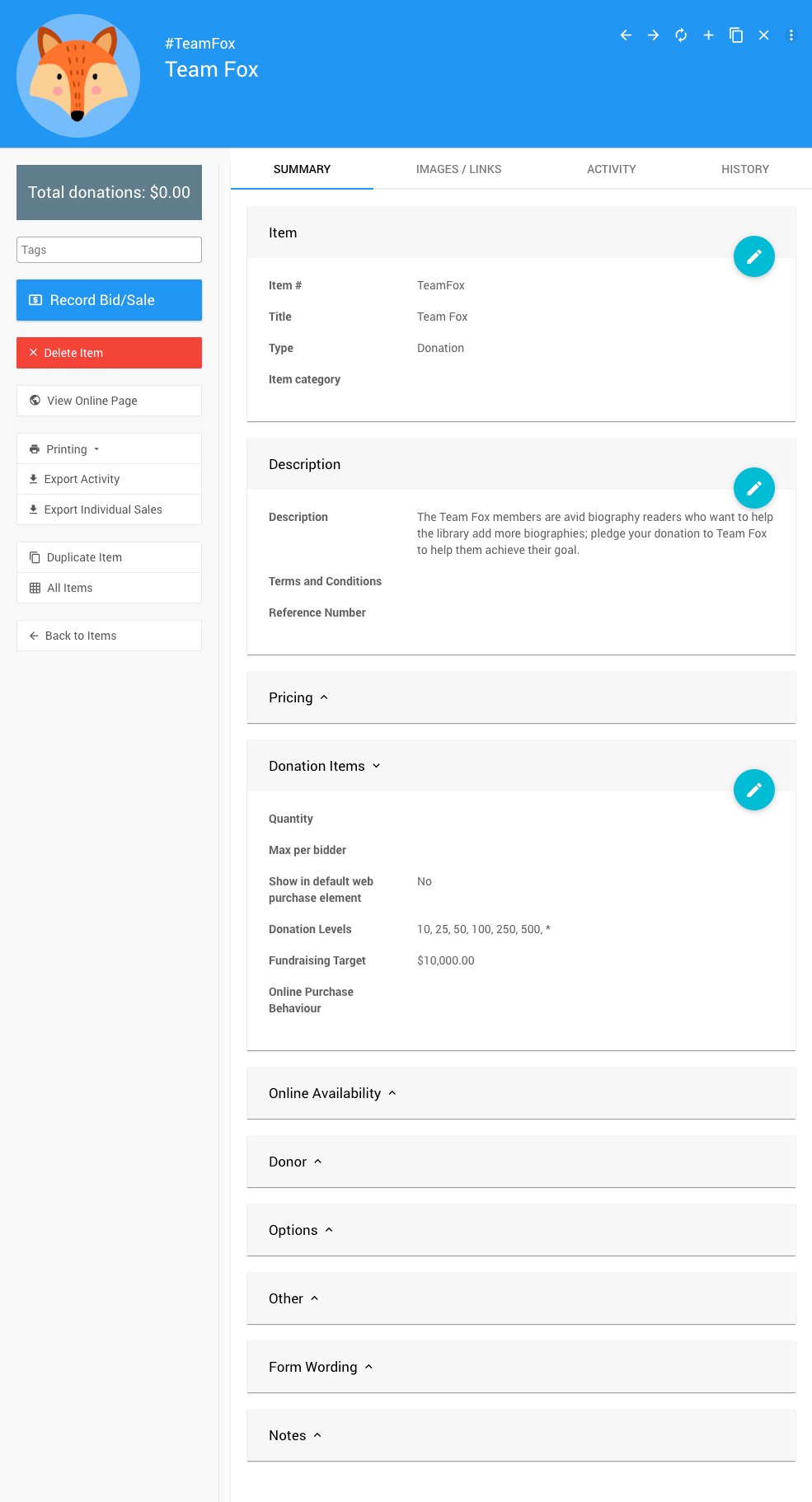
Each Donation Item includes a custom description, a unique Item Number, and any relevant details you want to spotlight.
img

An example Donation Item configured for a team using a custom Item #.

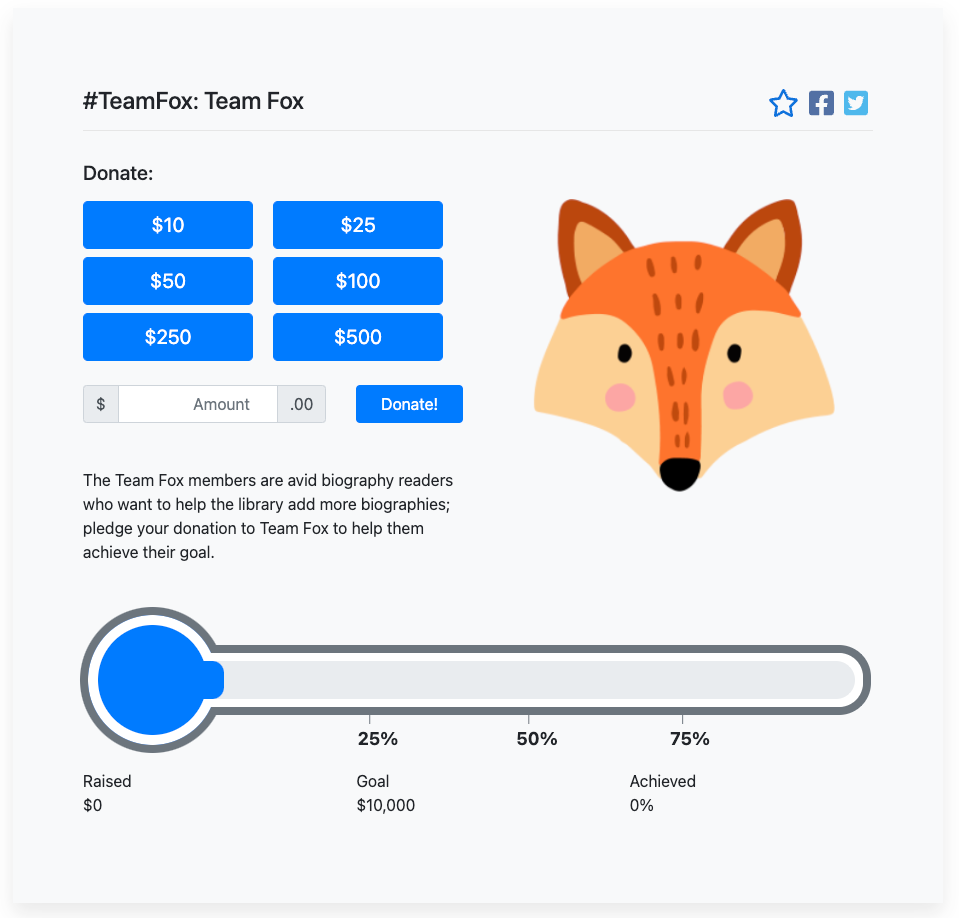
Team Captains can share their item link directly with supporters. A custom Item Number (e.g., TeamFox) makes the URL easy to remember and point people to.
img

A sample public item page for a team's fundraising effort.

Custom Item Numbers

You can use the automatically generated default Item number, but a custom Item number can make sharing easier, especially when teams are promoting their pages on social media or in emails.

You can also highlight all teams together on your event website so supporters can browse and choose who they want to back.

img

An example of a website section displaying all team fundraising pages in one place.

💡 Tips & Ideas

  • Add Profile Cards to your website to showcase team captains or participants. You can link each profile card directly to the team's Donation Item.
  • Want more teams to join? Use the Donate An Item Website Element form to let supporters sign themselves up as new Team Captains.

See also:

  • Donation Items
  • How To Add Cash Donations To Website
  • How To Set Up An In-Person Event

Last reviewed: November 2025
guide.auctria.com/redirect?id=PeerToPeer
PeerToPeer
/items/items_how_to/peer_to_peer/
items
items_how_to
peer_to_peer
Peer To Peer
Learn how to set up Peer-to-Peer style items in Auctria.
Online Pre-Bidding
Pricing Examples