
Understand the fees for credit card payments and how to handle them.
When you accept credit card payments, there are two types of fees:
- Fees from your payment processor (Stripe or Authorize.net)
- Fees from Auctria for the integration service.
Understanding the Fees
Auctria Integration Fees
Auctria charges a small percentage based on your subscription plan at the time the charge is made:
| Your Plan | Auctria Fee |
|---|---|
| Explorer | 1.00% |
| Emerald | 0.50% |
| Diamond | 0.25% |
How fees are collected:
- Using Stripe: Auctria's fee is automatically deducted before Stripe deposits money into your bank account
- Using Authorize.net: We invoice you for the fees after your event (see Auctria Balance for details)
Payment Processor Fees
Stripe Costs
Stripe charges $0.30 + 2.9% per transaction in North America with no monthly or minimum fees. You only pay for transactions you process.
Example: If someone pays $100, Stripe charges $3.20 ($0.30 + $2.90).
Stripe Nonprofit Discount
If you're a 501(c)3 organization, you may qualify for lower rates. See Stripe's nonprofit discount program for details.
Stripe Tap-to-Pay Charges
Stripe charges an additional $0.10 per tap-to-pay authorization (or C$0.15 for Canadian customers), even if the charge doesn't complete. See Stripe's pricing page for current rates.
Authorize.net Costs
Authorize.net charges $25/month (regardless of usage) plus $0.10 per transaction when used as a gateway. You'll also pay processing fees to your merchant account provider.
Total Fees (Using Stripe)
When you combine both fees, here's what you'll pay per transaction:
- Explorer plan: $0.30 + 3.9% per transaction
- Emerald plan: $0.30 + 3.4% per transaction
- Diamond plan: $0.30 + 3.15% per transaction
Tracking fees: You can see the exact fees for each transaction in the Details section of your Credit Card Reports.
Who Pays the Fees?
Important to Understand
Your organization always pays the credit card processing fees and Auctria integration fees on every credit card transaction.
However, when you choose to have bidders pay the fees, they pay an extra amount on top of their balance. This extra amount covers all the fees, leaving the full donation, purchase, and winning bid amounts for your organization.
You have three options for handling credit card fees:
Option 1: Quiet Mode (Default)
Your organization absorbs the fees.
- A bidder owing $100 pays exactly $100
- You receive $100 minus the processing fees (around $96.60 with an Emerald plan)
- Bidders don't see any mention of credit card fees
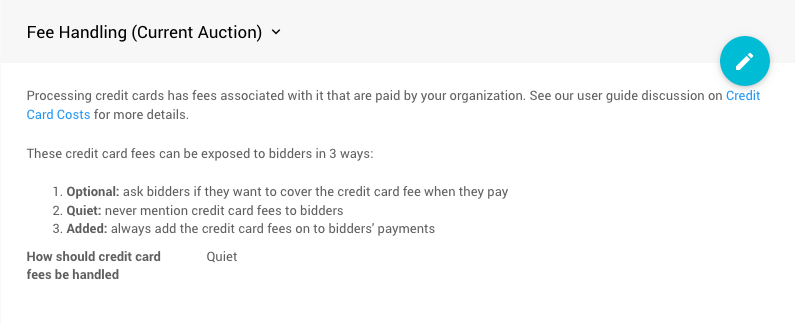
The default "Quiet" mode setting.
Option 2: Optional Mode
Bidders can choose to cover the fees.
- A bidder owing $100 sees a checkbox to add credit card fees
- If they check it, they pay $103.81 (for Emerald plan)
- If they don't check it, they pay $100 and you absorb the fees
- You receive the full $100 when they choose to cover fees
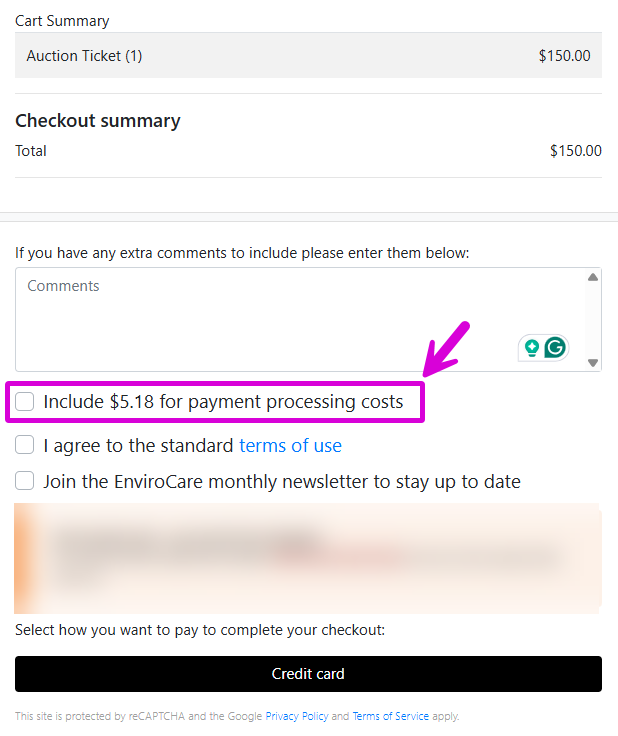
Bidders see a checkbox to optionally cover fees.
Option 3: Added Mode
Bidders must pay the fees.
- A bidder owing $100 automatically sees $103.81 as their total
- They must pay the credit card fees
- You receive the full $100
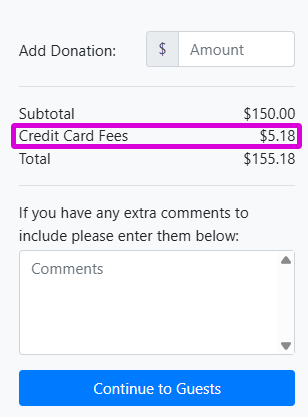
Credit card fees are automatically added to the total.
Change your setting: See Fee Handling for instructions on changing these options.
For more details, see Why Are My Fees Not What I Thought?
How Fee Calculations Work
When bidders pay the credit card fees (Optional or Added mode), the calculation ensures you receive the full amount owed.
Simple Example
Let's say a bidder owes $100 and you have an Emerald plan (0.5% Auctria fee):
What the bidder pays: $103.81
How it breaks down:
- Original amount: $100.00
- Stripe's per-transaction fee: $0.30
- Processing fees on $100 (2.9% + 0.5%): $3.40
- Extra fees charged on the surcharge itself: $0.11
- Total: $103.81
What you receive: $100.00
The surcharge of $3.81 is slightly higher than the $3.70 in fees because we also need to cover the fees charged on the surcharge itself.
Why the Calculation is Complex
The math has to account for:
- Stripe's fixed fee ($0.30 per transaction)
- Stripe's percentage (2.9%)
- Auctria's percentage (based on your plan)
- The fact that Stripe charges fees on the entire amount including the surcharge
Important!
Auctria only charges our fee on the original amount owed, not on the surcharge portion. However, we can't control Stripe's fees, so they charge 2.9% on everything.
Larger Example
A bidder owes $1,110 and you have an Emerald plan:
What the bidder pays: $1,149.18
How it breaks down:
- Stripe's fee: $0.30 + ($1,149.18 × 2.9%) = $33.63
- Auctria's fee: $1,110 × 0.5% = $5.55 (only on the original amount)
- Amount you receive: $1,149.18 - $33.63 - $5.55 = $1,110.00
Configuring Your Processor Fees
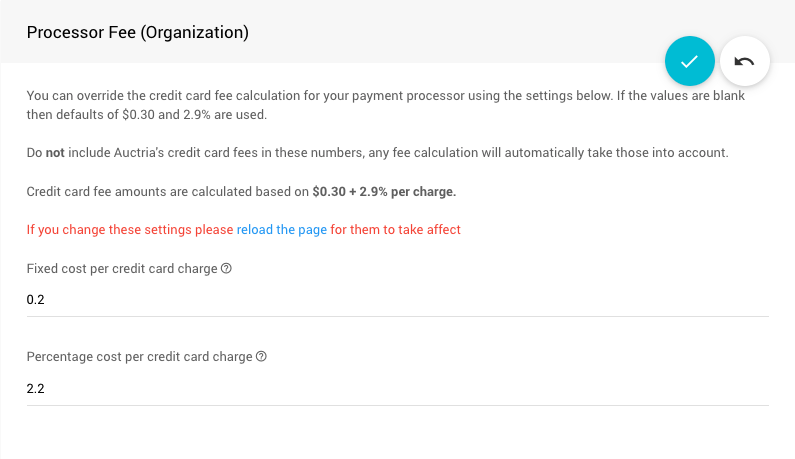
By default, Auctria assumes you pay Stripe's standard rate of $0.30 + 2.9%. If your organization qualifies for a discount or uses different rates, you can customize this:
- Click Credit Cards from your main Auction Dashboard
- Find the Surcharge Settings section
- Update the Processor Fee (Organization) values
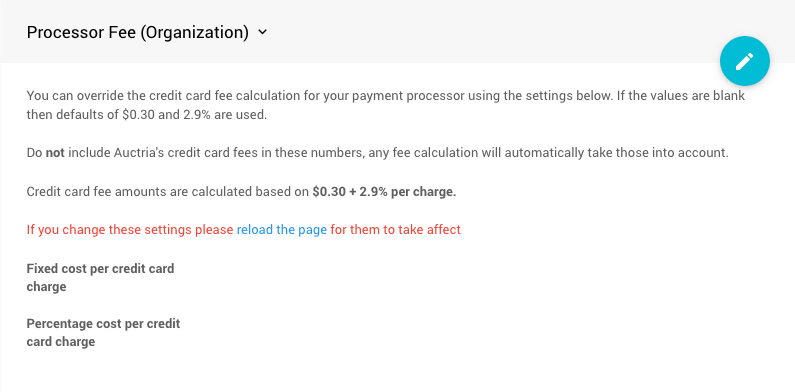
You can set:
- Fixed cost (the flat fee per transaction, like $0.30)
- Percentage cost (the percentage fee, like 2.9%)
Example configuration:
Important Notes
- If you pay tiered rates or different rates for different card types, use representative average values
- If you set fees higher than what you actually pay, bidders will be charged too much (but you'll receive that extra amount - Auctria doesn't benefit from it)
- If you set fees lower than what you actually pay, you'll receive less than the full amount owed
Refunding Credit Card Fees
When you issue a credit card refund through the bidder's Activity tab, here's what happens with fees:
Auctria Fees
Auctria always refunds our integration fees when you process a refund through Auctria.
Stripe Refunds
Whether Stripe refunds their fees depends on when you opened your Stripe account:
- Account opened before September 14, 2017: Stripe refunds their fees (no cost to you)
- Account opened after September 14, 2017: Stripe keeps their fees (you lose that amount on refunds)
For more details, contact Stripe at support@stripe.com.
Why this matters
If you refund a $100 payment and Stripe doesn't refund their fees, you'll lose about $3.20 even though the bidder receives their full $100 back.
Authorize.net Refunds
We don't have visibility into your merchant account's refund policy. Contact your merchant account provider directly to understand their refund fees.
Quick Reference
Need help?
- Nonprofit rates available: Check Stripe's nonprofit program
- Change who pays fees: See Credit Card Settings
- More questions: See Why Are My Fees Not What I Thought?