Donation Items represent projects that guests can donate to for a specific purpose — without making a purchase or winning an auction item.
For example, a Donation Item might be used to raise money for a new school gym and be titled "Spring Clean Up". Every donation recorded against a Donation Item is charged to the bidder and appears in the Donations section of their Participant Statements.
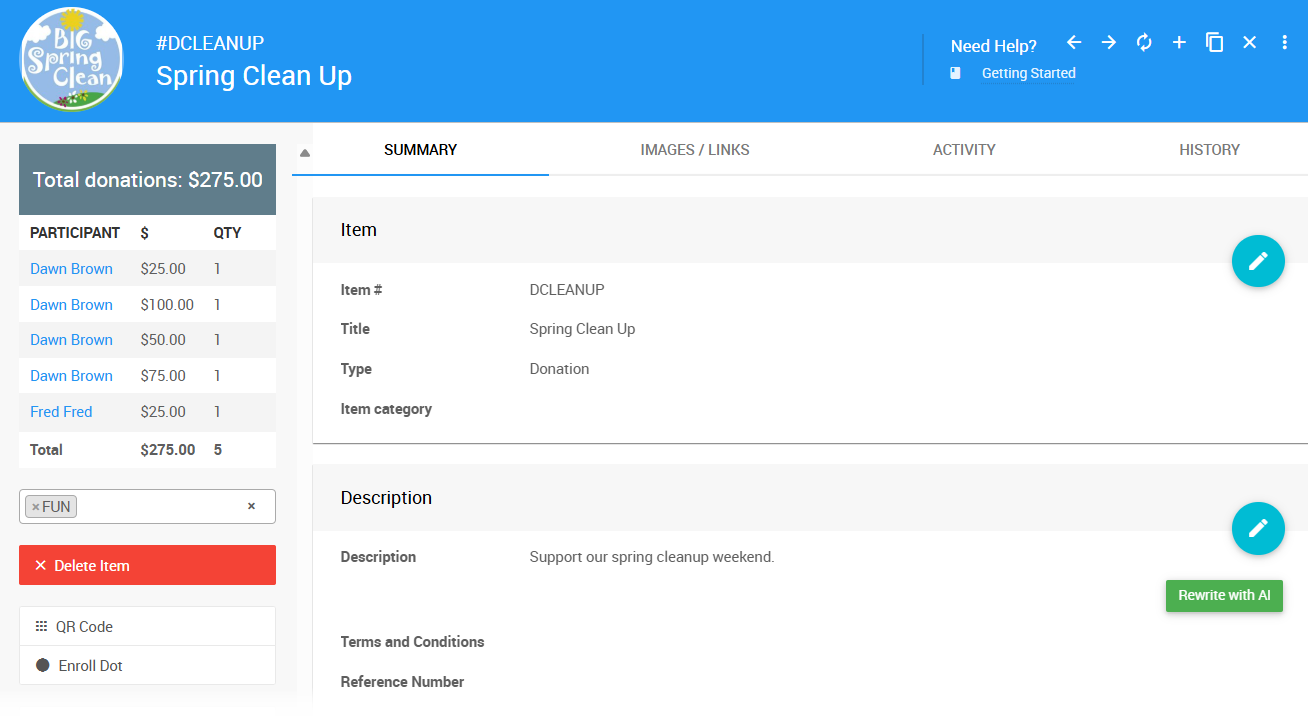
An example taken from a demonstration event.
See Fund-A-Need for more information on how you can use Donation Items.
| Field | Description |
|---|
| Item # | Auctria assigns one automatically, or you can enter your own. Item numbers can include letters and numbers, but must be unique across all items in your event. |
| Title | A short, descriptive name for the item. This appears on bid sheets, participant statements, and the event catalog. |
| Type | Controls how the item behaves. For Donation Items, this should be set to Donation. |
| Item Category | An optional category to help organize items in your event. See Item Categories for more information. |
| Field | Description |
|---|
| Description | A detailed description of the item. Use the Rewrite with AI button for assistance drafting this text. |
| Terms & Conditions | Any specific terms and conditions participants should be aware of for this item. |
| Reference Number | An optional field for any external reference number associated with the item. |
| Field | Description |
|---|
| Value | A monetary value for the item. |
| Taxable Value | Enter -2 to mark the item's taxable value as non-deductible on statements. See Taxable Value for more information. |
| Shipping Cost | Amount to charge for shipping to winners of this item. See Shipping for more details. |
| Sales Tax Category | Sales tax category for this item. See Sales Tax Categories for more details. |
| Field | Description |
|---|
| Quantity | The number available. Leave blank or enter 0 for an unlimited amount. For Online items, a blank quantity implies a single item. For multiple winners, enter the exact amount available. |
| Max per participant | The maximum number a single participant can purchase (applies to multiples only). |
| Show in default web purchase element | Shows this item in the default purchase element in the standard website templates. |
| Donation Levels | A comma-separated list of suggested donation amounts, for example 100,500,1000. Add ,* at the end to also allow a custom amount to be entered. |
| Fundraising Target | The amount you are looking to raise with this item. This is shown publicly and triggers a progress tracker on the item's details page. |
| Online Purchase Behaviour | Controls how this item is added to the shopping cart, or whether it goes on account for the participant. See Online Purchase Behavior for more details. |
| Field | Description |
|---|
| Override online visibility start | Sets a specific time for when this item becomes visible on the auction website, overriding the event default. |
| Override online visibility end | Sets a specific time for when this item stops being visible on the auction website, overriding the event default. |
| Override online bidding/sales start | Sets a specific start time for online bidding or sales for this item, overriding the event default. |
| Override online bidding/sales end | Sets a specific end time for online bidding or sales for this item, overriding the event default. |
| Field | Description |
|---|
| Donated by | The person or organization that donated the item. See Item Donors Dashboard for more information. |
| Solicited by | The name of the person who approached the donor about this donation. This is an internal field only. |
| Receiptable Value | The value to show on the donor receipt, if different from the item value. Leave blank if they are the same. |
| Receipt Required | An informational checkbox only — no functionality is attached. Can be used as a reminder that the item donor requested a receipt. |
| Field | Description |
|---|
| Is basket/lot package? | Marks this item as a basket or package containing partial or for sale items. Once saved with this enabled, a Contents tab will be added to the item. |
| Is gift certificate | Allows gift certificates to be printed for this item from Auctria. |
| Is event | Marks this item as a scheduled event (e.g., a concert or dinner party). Enabling this will open the Scheduled Event panel for additional details. |
| Highlight item | Allows this item to be displayed in an Item Catalog configured to show highlighted items. |
| Exclude from website & catalog | Always excludes this item from all printed and online catalogs. |
This section appears when Is event is enabled, and is used for items that represent a scheduled event at a specific date and time.
| Field | Description |
|---|
| Event Start Time | The start time of the scheduled event. |
| Event Location | The location where the scheduled event will take place. |
| Field | Description |
|---|
| Location | An informational field for noting the physical location of the item, such as a table number at an in-person event. |
| Bidsheet Closing Time | An informational field for Paper Bidding type items, used to note the time when bidding on this item will close. |
These fields allow you to override the item description with custom text on specific forms and pages. If left blank, the item description is used by default.
| Field | Description |
|---|
| Display page text | Shown on the item's display page instead of the description. |
| Bid sheet text | Shown on the bid sheet instead of the description. |
| Certificate text | Shown on the certificate instead of the description. |
| Catalog text | Shown in the event catalog instead of the description. |
| Statement text | Shown on participant statements. |
| Ticket title | Shown in place of the item title wherever participants see their purchased tickets, such as the Ticket Hub and on e-Tickets. |
When enabled, Advanced Tagging causes the tags assigned to this item to pass through to the purchaser or winner of the item. See Where Tags Can Be Used In Auctria for more information.
A free-form internal notes field. This information is not displayed anywhere publicly and is intended for organizer use only.
