
Learn how to sell free or discounted tickets in Auctria.
Overview
This page covers ways to sell free or discounted tickets, such as Teacher Tickets, Faculty Tickets, or Staff Tickets. For the standard ticket sale process, see How To Sell Tickets. Auctria also offers a few different methods for free or discounted sales — pick the one that best fits your event.
| Method | Use For |
|---|---|
| Force to $0 | Selling a ticket at no cost, one sale at a time. |
| Coupon Codes | Applying a percentage or fixed discount using a code guests enter at checkout. |
| How To Create a Ticket Donation Item | Letting donors "purchase" tickets for others at set donation levels, displayed on your event website. |
Force to $0
You can sell a ticket at no cost by checking Force to $0 on the Sell Tickets page.
- From Tickets, click Sell Tickets.
- Select the ticket item you're selling.
- Check Force to $0.
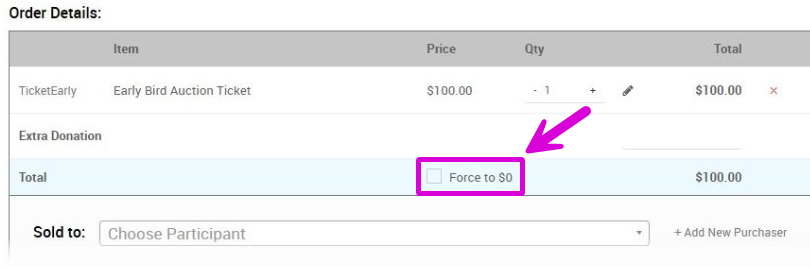
An example from a demonstration event.
- Choose the purchaser — select an existing participant or click Add New Purchaser — and complete the sale.
Coupon Codes
You can apply a coupon code to a ticket item to give guests a percentage or fixed dollar discount — for example, teacher:50 gives a 50% discount to anyone who enters teacher at checkout. See Coupon Codes for the full syntax, discount types, and examples.
Once a coupon is set up, you can test it from the Tickets dashboard:
- Click Tickets, then Sell Tickets.
- Select the ticket item you added the coupon code to.
- Click the Coupon Code field.
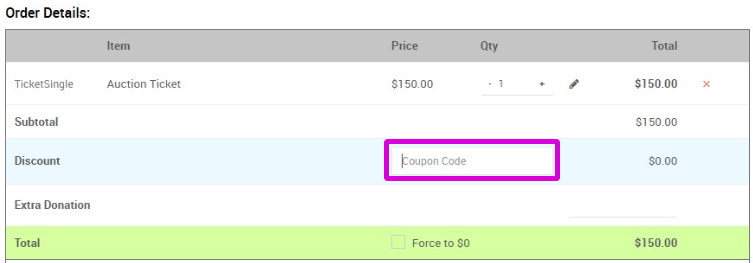
An example of the Coupon Code field from a demonstration event.
- Type the coupon code into the field to apply the discount.
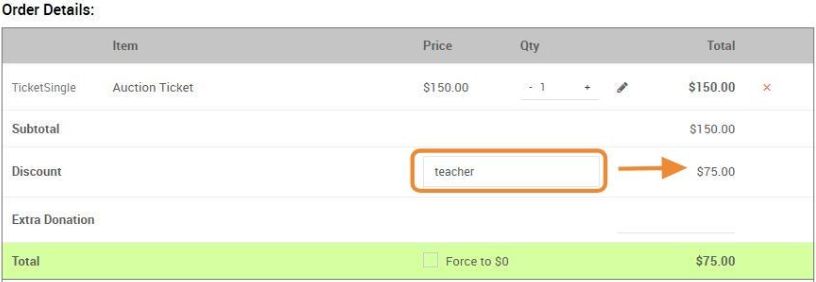
An example from a demonstration event.
- Continue the sale as normal.