
Auctria Academy
F.A.Q.
Getting Started
Popular Pages
Course
Auctria Dashboard
  • Getting Started
    • First Steps
      • Create Account & Event
    • Plan
    • Run
    • Close
    • Auctria Costs
    • Popular Pages
    • Glossary
    • Resources
  • Core Features
  • Event
    • Add A New Event
    • Change Events
    • Copy Event
    • Archive Event
    • Event Details
    • Event Permissions
    • Health Checks
    • Connectivity
    • Create An Online Store
    • Custom Questions
    • Event With Tickets
    • In-Person Events
    • Set Up A Donation Only Event
    • Set Up An In-Person Event
    • Set Up An Online Event
    • Terminology
  • Event Dashboards
    • Income Summary
    • Default Dashboard
    • Item Summary
    • Your Profile
      • Access My Profile
  • Credit Cards
    • Payment Processors
    • Credit Card Costs
    • Stripe
      • Connect Stripe Account
      • Change Test Mode
      • Export Stripe Data
      • Stripe Readiness Review
    • Authorize.Net
      • Configuration
      • Fraud Detection
      • Card Registration
      • Card Code Required
      • AVS Mismatch
      • Authorize.Net Readiness Review
    • Credit Card Settings
    • Credit Card Reports
    • Test & Live Modes
    • Participant Fee Coverage
    • Check Total Credit Card Fees
    • Registered Credit Cards
    • Remove All Registered Cards
    • Credit Card Full Refunds
    • Credit Card Partial Refunds
    • Readers And Swipers
      • Standalone Card Readers
    • Connect A Mobile Card Reader
    • Create Online Payment Link
    • Require ReCaptcha Validation
    • Make cc.fees Tax Deductible
  • Auctions
    • Online Auctions
      • Participants In Online Events
    • Paper Auctions
    • Live Auctions
    • Online Bidding Settings
    • Kiosk Mode Bidding Setup
      • Slide Shows
      • Mobile Device Locking
    • Monitor Auction
  • Participants
    • Participant Details
    • Add New Participant
    • Participant Numbering
    • Sharing Participant Numbers
    • Turn Off Participant Numbers
    • Link Participants
    • Unlink Participants
    • Merge Participants
    • Copy Participants
    • Duplicate Participant
    • Participant Maintenance
      • Duplicate Emails
      • Duplicate Names
      • Link Participants
      • Multiple Tickets
    • Catering
    • Registration/Checkout
    • Statements
      • Email Statements
      • Printed Statements
      • Text Statements
    • Choose Participants Filters
    • Correct Email Typos
  • Communication
    • Email
      • System Emails
        • System Emails Summary
        • System Email Options
      • Custom Emails
      • Send Custom Emails
      • Email Manager
      • Editing Emails
        • Email Element Visibility
        • Email Safe Fonts
      • Add Block
      • Add Table References
      • Use Conditional Content
      • Customize Email Header
      • Customize Email Footer
      • Email Edits For Online Auctions
      • Email Ticket Holders
      • Email Participants With A Balance
      • Email Text Link
      • Review Duplicate Emails
    • Text Messages
      • Text Settings
      • Text Options
      • Participants & Phone Numbers
      • Advanced Texting Profile
      • Set Up Advanced Texting
      • Send Custom Text
      • Text-To-Give
      • Transfer Text Number
      • A2P 10DLC
    • System Notifications
    • Mobile Notifications
    • Transactional vs Marketing Emails
    • Ticket Sales Communication
  • Items
    • Item Types
      • Paper Bidding Type
      • Live Bidding Type
      • Online Bidding Type
      • Partial Items
      • For Sale Items
      • Donation Items
      • Raffle Prize Items
      • Buy It Now Only Items
    • Item Details
      • Summary
      • Images and Links
      • Contents
      • Activity
      • History
      • Open Item Bidding
    • Item Numbering
      • Bulk Renumbering
      • Drag And Drop Ordering
      • Live Auction Ordering
      • Random Shuffle
      • Set Next Item Number
    • Add New Items
    • Item Maintenance
      • Copy Items
      • Delete Item
      • Hide Items
      • Duplicate Items
      • Export Items
      • Open/Close Bidding
      • Open Multiple Quantity Items
      • Re-Open Unsold Items
    • Baskets And Packages
      • Build Baskets
      • Set Basket Descriptions
      • Basket Value
      • Combine For Sale Items
      • Combine Partial Lot Items
    • Batch Image Upload
    • Add A Scheduled Event Item
    • Choose Items Filters
    • Choose Items Sort
    • Pricing Policy
    • Pricing Examples
    • Multiple Winners
      • Winning Multiples
    • Online Pre-Bidding
    • Coupon Codes
    • Shipping
    • After Event Sales
    • Fund-A-Need
    • Peer-to-Peer
    • Auctria Voting
    • Sales Tax
      • Sales Tax Mode
    • Taxable Value
    • Create A Gift Certificate
    • Change Donation Item
    • Track Paddle Raise Donations
  • Financials
    • Expenses
      • Add A New Expense
      • Edit Expenses
      • Add Expense Category
    • Consignments
    • Reference Materials
  • Raffles
    • Creating Raffles
    • Add Tickets & Prizes
    • Running Raffles
    • How-To Guides
  • Tickets
    • Ticket Management
      • Add Or Edit Tickets
        • Add Early Bird Tickets
        • Add Early Bird Table Ticket
        • Add Multi-Day Tickets
      • Changing Tickets
      • Activate/Deactivate Tickets
      • Transfer Tickets
      • Repair/Reissue Tickets
      • Tables And Seating
        • Assign Seating
      • Meal Choices
      • E-Tickets
        • Preview E-Ticket
        • Ticket Styling
      • Ticket Claim
      • Ticket Statements
      • Ticket Details
      • Ticket Settings
    • Ticket Sales
      • Sell Tickets
      • Sell Free/Discount Tickets
        • Create Ticket Donation Item
      • Stop Selling Tickets
      • Managing Ticket Sales
      • Refund Tickets
    • How-To Guides
  • Sponsorships
    • Add & Sell Sponsorships
    • Sell a Sponsorship
    • Displaying Sponsors
  • Reports
    • Report Configuration
      • Change Report Views
      • Selecting By Tags
      • Drop-Down Selectors
      • Choosing Columns
    • Bulk Editing/Mass Changes
      • Bulk Editing
      • Delete Multiple Records
      • Bulk Edit Tags
      • Change Sales Tax Categories
    • Reference Materials
      • Item Reports
      • Donor Reports
      • Participant Reports
      • Ticket And Sponsorships Reports
      • Financial Reports
      • Other Reports
      • Raffles Reports
  • Actions
  • Check-In
    • Check-In By Organizer
    • Check-In Settings
    • Self Check-In Request
    • Participant Access
  • Checkout
    • Checkout By Organizer
    • Batch Checkout
    • How-To Guides
      • Delete Purchase With Payment
      • Add Shipping Costs Manually
      • Negative Payment Refund
      • Splitting Bids
      • Transfer Payments
      • Checkout And Payments
    • Checkout Payment Options
    • Online Purchase Behavior
    • Record Payment
    • Transfer Payment
    • Delete Non-CC Payment
    • Give Event Credits
    • Handling Payments
    • Issuing Refunds
  • Bidding Dashboard
    • How-To Guides
      • Promote Or Demote Bids
      • Edit Bids
      • Remove In-Progress Bid
      • Remove Maximum Bid
    • Editing Transactions
    • Live Auction
    • Online Auction
    • Paper Auction
  • Donations Dashboard
    • Dessert Dash
    • Record Donation
    • Paddle Raise
  • Sales Dashboard
    • Add For Sale Item
    • Add New Sponsorship
    • Add New Ticket
  • Event Website
  • Event Websites
    • Create New Event Website
    • Save & Restore Website
    • Get QR Code
    • Track Visitors
  • Website Editor
    • Website Editor Sidebar
      • Preview Website Pages
      • Manage Pages
        • Add New Page
        • Set Home Page
        • Custom Pages
        • System Pages
        • Purpose-Built Pages
      • Current Page Settings
      • Theme Settings
      • Site Settings
      • Add Rows & Sections
      • Website Locked
      • Website Editor Mode Effects
    • Configure Menu Entries
      • Special Pages
      • Hide Website Pages
    • Page Properties
      • Edit Columns
    • Website Content
      • Headers and Footers
      • Row Content
        • Item Catalog
        • Header
        • Donation Element
        • Donor Catalog
        • Footer
        • Sponsors Catalog
        • Sponsors Row
        • Item Details
        • Leaderboard
        • Donate an Item
      • Column Content
        • Text Element
        • Heading
        • Image
        • Button
        • Divider
        • Image Carousel
        • Item Image Carousel
        • Parallax Image
        • Countdown
        • Expandable Block
        • Document Preview
        • Progress Tracker
        • Map
        • Share Event
        • Video
        • YouTube Live Chat
        • Profile Bar
        • Callout
        • Content Cards
        • Hero Element
        • Profile Cards
        • Quote
      • Common Element Actions
        • Add Behavior
          • Website Element Visibility
          • Date and Time View
        • Add Button
        • Add Cash Donations
        • Add a Pop-Up Video
        • Add Style
          • Background
          • Fonts
          • Height
        • Change Catalog Button Colors
        • Catalog Style
        • Choose File
        • Choose Image
        • Color Picker
        • Configure Items Displayed
        • Item Catalog Custom Cards
        • Display Donation Items
        • Clickable Images
        • Modify Bidder Registration Form
        • Move Elements
        • Customize Shopping Cart
        • Track Bidder Donations
      • Fix Page Content
  • Online Experience
    • Website Guest Experience
    • Self Check-In
    • My Account
    • Ticket Hub
    • Placing Bids
      • Bid Extension for Bidders
      • Kiosk Mode Bidding
      • Text Bidding
    • Maximum Bidding
      • Max Bidding Examples
      • Change Maximum Bid
    • Mobile Bidding
      • Bidder Mobile App
      • Bidder Sign In
      • Sign Into A Different Event
  • Mobile Apps
  • Auctria Mobile Apps
  • Auctria Admin App
    • Admin App Check-In
    • Admin App Checkout
    • Admin App Bids & Donations
    • Admin App Sales
    • Charging A Credit Card
    • Mobile Card Readers
    • Pairing A Phone
    • Registering Credit Cards
    • Scan QR Codes
  • More Features
  • Settings
  • Online Settings
    • Online Availability
    • Online Bidding Times
    • How-To Guides
      • Online Pay Later
      • Reopen Online Bidding
      • Set Limited Ticket Times
      • Closing Online Bidding
      • Pause An Online Event
      • Set Up Online Pre-Bidding
      • Tracking Online Donations
    • Online Visibility
    • Timezones
  • Organizations
    • Auctria License
    • Auctria Balance
    • Upgrade License
    • User Accounts
    • Adding Users
    • Edit Users
    • Removing Users
    • Replace User
    • Tag Maintenance
    • Filters
    • Change Contact Email
    • New Organization By Participant
    • Create Test Event
    • Standalone Card Readers
  • Categories
    • Item Categories
      • Add New Category
      • Grouping Items By Category
    • Expense Categories
    • Sales Tax Categories
    • Consignment Categories
      • Add Consignment Categories
    • Edit Categories
    • Ordering Categories
  • Item Donors
    • Add In-Kind Donation
    • Add Item Donor
    • Item Donors Dashboard
      • Item Donor Details
      • Donor Receipts
      • Donor Maintenance
    • Solicited Items Settings
    • Solicited Items
  • Printing
    • How-To Guides
      • Pre-Populate Bid Sheet Values
      • Print Quantity On Bid Sheets
      • Defining Bid Sheet Columns
      • Customize Bid Sheets
      • Generate Thank You Letters
      • Fix Blank Pages
      • Word Documents
      • Print Participant Paddles
      • Print Bid Sheets 2 Up
      • Print Catalog Booklet
      • List Terms and Conditions
    • Reference Materials
      • Bid Sheets
      • Event Catalog
      • Display Pages
      • Gift Certificates
      • Live Reporting Sheet
      • Stationery
    • Attach Stationery
    • Baskets & Forms
    • Bid Sheets Examples
    • Create Stationery
    • Word Templates
    • Labels
      • Item Labels
      • Donor Mailing Labels
    • Upload Stationery
  • Images
    • Adding And Modifying Images
      • Select a Default Image
      • Edit Images
      • Delete Images
    • Dimensions And Sizes
  • Advanced
  • Advanced Features
    • Advanced Tagging
      • Using Advanced Tagging
    • Adding Custom CSS
      • Site Custom CSS
      • Current Element Custom CSS
        • Checkout Form Stylings
        • Item Catalog Stylings
        • Item Details Stylings
        • Sponsor Catalog Stylings
        • Video Element Stylings
    • Advanced Mode
    • Custom Website Variables
    • Advanced How To Guides
      • Convert To Online Only
    • Filter Reference
      • Bid History
      • Credit Card Charge
      • Donation
      • Donor
      • Expense
      • Item
      • Item Category
      • Item Donors
      • Organization
      • Payment
      • Raffle
      • Raffle Ticket
      • Solicited Item
      • Ticket
      • Participant
      • Event
    • Item Catalog Template
    • Using Tags In Auctria
  • Import/Export
    • Map Fields for Import
    • Export Settings
    • LGL Export
  • Advanced Styling
    • Styling By Target
    • Styling by Code
On This Page
🎟️ Admission Tickets
✨ Add a Ticket
✏️ Edit a Ticket

Adding And Editing Tickets

This page briefly overviews where to add or modify your in-person event Admission Ticket items.


🎟️ Admission Tickets

Admission Tickets in Auctria represent either a single admission or multiple admissions for your event. You can use them for individual guests or entire groups.

For example, a "Table for Eight" ticket might include admission for up to 8 guests. Set Tickets Per Sale to 8, and Auctria creates 8 participant records for each guest, sharing or separate Paddle#s as you choose.

Note

Auctria may also create a unique Table# to group guests together at your event.

Admission tickets only

Only use this page to create tickets that represent event admissions, including sponsorship tickets. Don't use it for raffle tickets or drink tickets — these don't grant event admission.


✨ Add a Ticket

The easiest way to add a new ticket item is through Add Ticket Item on your Tickets dashboard. This ensures the ticket is properly categorized as a "For Sale" item and includes the correct number of participants.

  1. From your event dashboard, click Tickets → Add Ticket Item.
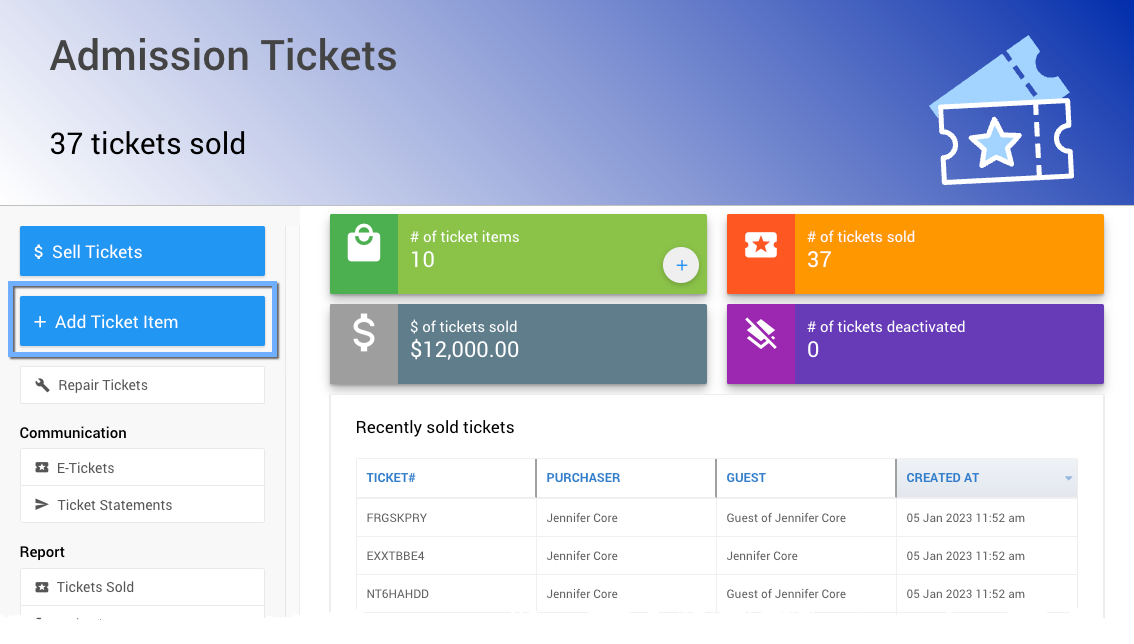
Add Ticket Item button on the Tickets dashboard

An example Tickets Dashboard from a demonstration event.
  1. Fill in the ticket's details on the Add Ticket page:
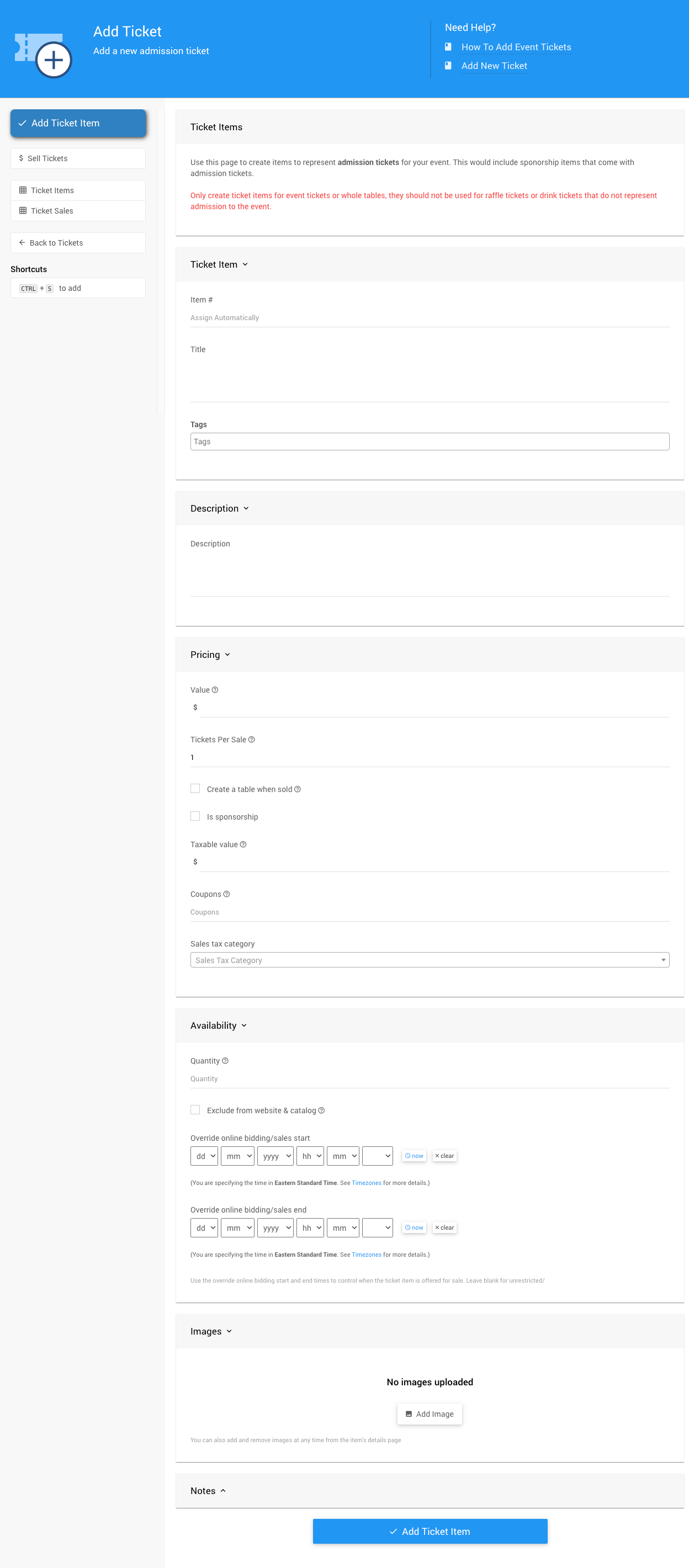
Add Ticket page with ticket detail fields

An example Add Ticket page from a demonstration event.
FieldDescription
Ticket Item TitleHow the ticket appears on your website (e.g., "Early Bird Ticket").
Pricing ValueThe price of the ticket.
Tickets Per SaleThe number of admissions this ticket grants (e.g., 1 for an individual, 8 for a table).
Availability QuantityHow many tickets are available for sale. Leave blank or set to 0 for unlimited availability.
  1. Click Add Ticket Item to save your new ticket.

Use meaningful item numbers

Assign a meaningful Item#, like EARLYBIRD, instead of the default system-generated number. This makes tickets easier to find and manage later.


✏️ Edit a Ticket

  1. Locate the ticket item in the All Items report, or under the Tickets dashboard.
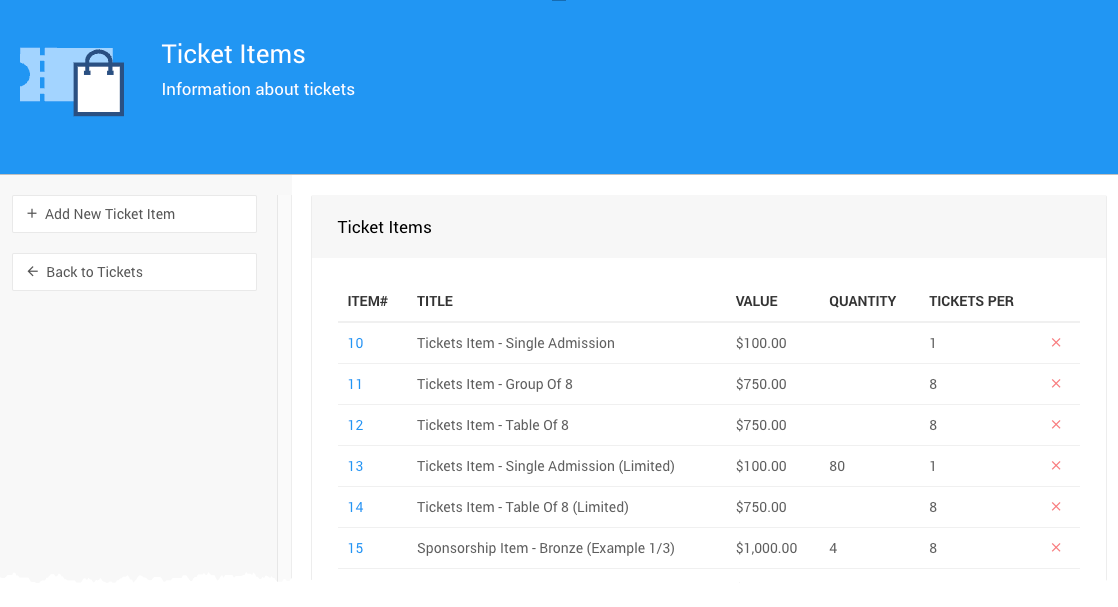
Ticket items listed in the All Items report

An example All Items report from a demonstration event.
  1. Hover over the ticket's Item# and click Details, or double-click the Item#, to view and edit the ticket's details.
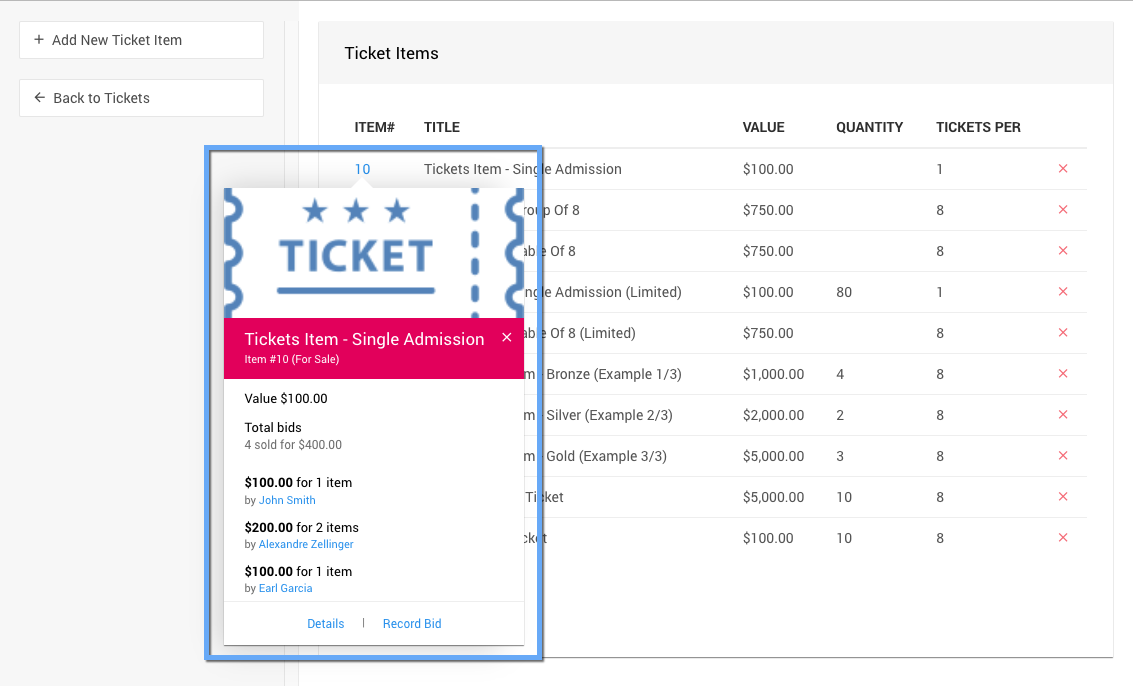
Details link shown when hovering over an item number

An example from a demonstration event.

In this section:

  • How To Add Early Bird Tickets
  • How To Add an Early Bird Table Ticket
  • Add Different Time & Multi-Day Tickets

See also:

  • Tickets

Last reviewed: August 2026
guide.auctria.com/redirect?id=AddingEditingTickets
AddingEditingTickets
/tickets/ticket_management/add_new_ticket/
tickets
ticket_management
add_new_ticket
Adding And Editing Tickets
This page briefly overviews where to add or modify your in-person event Admission Ticket items.
Ticket Management
Add Early Bird Tickets