
Learn how guests can use the Auctria mobile bidding app on Apple and Android devices to participate in your event.
The Auctria mobile bidding app is available for iOS and Android and is designed for both long-running online auctions and in-person events. Guests receive push notifications on their device when they are outbid, win an item, or have placed the high bid.
Bidder app only
The Mobile Bidding App is for bidders only and cannot access your organization's auction dashboards. See Auctria Admin App for information on the organizer app.
Android App
The Auctria mobile bidding app is available on the Google Play Store.
iOS App
The Auctria mobile bidding app is available on the Apple App Store.
Mobile Device Link
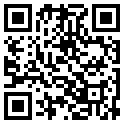
Guests can also download the app by scanning the QR code below or visiting https://auctria.events/mobile — the link automatically directs to the correct store based on their device.
Sharing the download link
This QR code and short URL are the easiest ways to share the app with guests — you can display the QR code at your venue or include the link in your event communications.
Using the Mobile Bidding App
The Auctria Mobile Bidding App gives guests a streamlined experience for browsing and bidding on items from their phone.
See Bidder Mobile App for details on how the app works.
Signing In
Guests sign in to the app using their email address and event details.
See How Bidders Sign In for details on the sign-in process.
Switching Events
If a guest participates in multiple events, they can switch between them from within the app.
See Sign Into A Different Event for details.