
Auctria Academy
F.A.Q.
Getting Started
Popular Pages
Course
Auctria Dashboard
  • Getting Started
    • First Steps
    • Plan
    • Run
    • Close
    • Auctria Costs
    • Popular Pages
    • Glossary
    • Resources
  • Core Features
  • Event
    • Add A New Event
    • Change Events
    • Copy Event
    • Archive Event
    • Event Details
    • Event Permissions
    • Health Checks
    • Connectivity
    • Create An Online Store
    • Custom Questions
    • Event With Tickets
    • In-Person Events
    • Set Up A Donation Only Event
    • Set Up An In-Person Event
    • Set Up An Online Event
    • Terminology
  • Event Dashboards
    • Default Dashboard
    • Income Summary
    • Item Summary
    • Your Profile
      • Access My Profile
  • Credit Cards
    • Payment Processors
    • Credit Card Costs
    • Stripe
      • Connect Stripe Account
      • Change Test Mode
      • Export Stripe Data
      • Stripe Readiness Review
    • Authorize.Net
      • Configuration
      • Fraud Detection
      • Card Registration
      • Card Code Required
      • AVS Mismatch
      • Authorize.Net Readiness Review
    • Credit Card Settings
    • Credit Card Reports
    • Test & Live Modes
    • Participant Fee Coverage
    • Check Total Credit Card Fees
    • Registered Credit Cards
    • Remove All Registered Cards
    • Credit Card Full Refunds
    • Credit Card Partial Refunds
    • Readers And Swipers
      • Standalone Card Readers
    • Connect A Mobile Card Reader
    • Create Online Payment Link
    • Require ReCaptcha Validation
    • Make cc.fees Tax Deductible
  • Auctions
    • Online Auctions
      • Participants In Online Events
    • Paper Auctions
    • Live Auctions
    • Online Bidding Settings
    • Kiosk Mode Bidding Setup
      • Slide Shows
      • Mobile Device Locking
    • Monitor Auction
  • Participants
    • Participant Details
    • Add New Participant
    • Participant Numbering
    • Sharing Participant Numbers
    • Turn Off Participant Numbers
    • Link Participants
    • Unlink Participants
    • Merge Participants
    • Copy Participants
    • Duplicate Participant
    • Participant Maintenance
      • Duplicate Emails
      • Duplicate Names
      • Link Participants
      • Multiple Tickets
    • Catering
    • Registration/Checkout
    • Statements
      • Email Statements
      • Printed Statements
      • Text Statements
    • Choose Participants Filters
    • Correct Email Typos
  • Communication
    • Email
      • System Emails
        • System Emails Summary
        • System Email Options
      • Custom Emails
      • Send Custom Emails
      • Email Manager
      • Editing Emails
        • Email Element Visibility
        • Email Safe Fonts
      • Add Block
      • Add Table References
      • Use Conditional Content
      • Customize Email Header
      • Customize Email Footer
      • Email Edits For Online Auctions
      • Email Ticket Holders
      • Email Participants With A Balance
      • Email Text Link
      • Review Duplicate Emails
    • Text Messages
      • Text Settings
      • Text Options
      • Participants & Phone Numbers
      • Advanced Texting Profile
      • Set Up Advanced Texting
      • Send Custom Text
      • Text-To-Give
      • Transfer Text Number
      • A2P 10DLC
    • System Notifications
    • Mobile Notifications
    • Transactional vs Marketing Emails
    • Ticket Sales Communication
  • Items
    • Item Types
      • Paper Bidding Type
      • Live Bidding Type
      • Online Bidding Type
      • Partial Items
      • For Sale Items
      • Donation Items
      • Raffle Prize Items
      • Buy It Now Only Items
    • Item Details
      • Summary
      • Images and Links
      • Contents
      • Activity
      • History
      • Open Item Bidding
    • Item Numbering
      • Bulk Renumbering
      • Drag And Drop Ordering
      • Live Auction Ordering
      • Random Shuffle
      • Set Next Item Number
    • Add New Items
    • Item Maintenance
      • Copy Items
      • Delete Item
      • Hide Items
      • Duplicate Items
      • Export Items
      • Open/Close Bidding
      • Open Multiple Quantity Items
      • Re-Open Unsold Items
    • Baskets And Packages
      • Build Baskets
      • Set Basket Descriptions
      • Basket Value
      • Combine For Sale Items
      • Combine Partial Lot Items
    • Batch Image Upload
    • Add A Scheduled Event Item
    • Choose Items Filters
    • Choose Items Sort
    • Pricing Policy
    • Pricing Examples
    • Multiple Winners
      • Winning Multiples
    • Online Pre-Bidding
    • Coupon Codes
    • Shipping
    • After Event Sales
    • Fund-A-Need
    • Peer-to-Peer
    • Auctria Voting
    • Sales Tax
      • Sales Tax Mode
    • Taxable Value
    • Create A Gift Certificate
    • Change Donation Item
    • Track Paddle Raise Donations
  • Financials
    • Expenses
      • Add A New Expense
      • Edit Expenses
      • Add Expense Category
      • Add Category to Expense
    • Consignments
    • Reference Materials
  • Raffles
    • Creating Raffles
    • Running Raffles
    • How-To Guides
  • Tickets
    • Ticket Management
      • Add Or Edit Tickets
        • Add Early Bird Tickets
        • Add Multi-Day Tickets
      • Changing Tickets
      • Activate/Deactivate Tickets
      • Transfer Tickets
      • Repair/Reissue Tickets
      • Tables And Seating
        • Assign Seating
      • Meal Choices
      • E-Tickets
        • Preview E-Ticket
        • Ticket Styling
      • Ticket Claim
      • Ticket Statements
      • Ticket Details
      • Ticket Settings
    • Ticket Sales
      • Sell Tickets
      • Sell Free/Discount Tickets
      • Stop Selling Tickets
      • Managing Ticket Sales
      • Refund Tickets
    • How-To Guides
  • Sponsorships
    • Add & Sell Sponsorships
      • Sell Sponsorships
    • Displaying Sponsors
  • Reports
    • Report Configuration
      • Change Report Views
      • Selecting By Tags
      • Drop-Down Selectors
      • Choosing Columns
    • Bulk Editing/Mass Changes
      • Bulk Editing
      • Delete Multiple Records
      • Bulk Edit Tags
      • Change Sales Tax Categories
    • Reference Materials
      • Item Reports
      • Donor Reports
      • Participant Reports
      • Ticket And Sponsorships Reports
      • Financial Reports
      • Other Reports
      • Raffles Reports
  • Actions
  • Check-In
    • Check-In By Organizer
    • Check-In Settings
    • Self Check-In Request
    • Participant Access
  • Checkout
    • Checkout By Organizer
    • Batch Checkout
    • How-To Guides
      • Checkout And Payments
      • Delete Purchase With Payment
      • Add Shipping Costs Manually
      • Negative Payment Refund
      • Splitting Bids
      • Transfer Payments
    • Checkout Payment Options
    • Online Purchase Behavior
    • Record Payment
    • Transfer Payment
    • Delete Non-CC Payment
    • Give Event Credits
    • Handling Payments
    • Issuing Refunds
  • Bidding Dashboard
    • How-To Guides
      • Promote Or Demote Bids
      • Edit Bids
      • Remove In-Progress Bid
      • Remove Maximum Bid
    • Editing Transactions
    • Live Auction
    • Online Auction
    • Paper Auction
  • Donations Dashboard
    • Dessert Dash
    • Paddle Raise
    • Record Donation
  • Sales Dashboard
    • Add For Sale Item
    • Add New Sponsorship
    • Add New Ticket
  • Event Website
  • Event Websites
    • Create New Event Website
    • Save & Restore Website
    • Get QR Code
    • Track Visitors
  • Website Editor
    • Website Editor Sidebar
      • Preview Website Pages
      • Manage Pages
        • Add New Page
        • Set Home Page
        • Custom Pages
        • System Pages
        • Purpose-Built Pages
      • Current Page Settings
      • Theme Settings
      • Site Settings
      • Add Rows & Sections
      • Website Locked
      • Website Editor Mode Effects
    • Configure Menu Entries
      • Special Pages
      • Hide Website Pages
    • Page Properties
      • Edit Columns
    • Website Content
      • Headers and Footers
      • Row Content
        • Item Catalog
        • Header
        • Donation Element
        • Donor Catalog
        • Footer
        • Sponsors Catalog
        • Sponsors Row
        • Item Details
        • Leaderboard
        • Donate an Item
      • Column Content
        • Text Element
        • Heading
        • Image
        • Button
        • Divider
        • Image Carousel
        • Item Image Carousel
        • Parallax Image
        • Countdown
        • Expandable Block
        • Document Preview
        • Progress Tracker
        • Map
        • Share Event
        • Video
        • YouTube Live Chat
        • Profile Bar
        • Callout
        • Content Cards
        • Hero Element
        • Profile Cards
        • Quote
      • Common Element Actions
        • Add Behavior
          • Website Element Visibility
          • Date and Time View
        • Add Button
        • Add Cash Donations
        • Add a Pop-Up Video
        • Add Style
          • Background
          • Fonts
          • Height
        • Change Catalog Button Colors
        • Catalog Style
        • Choose File
          File Sources
        • Choose Image
        • Color Picker
        • Configure Items Displayed
        • Item Catalog Custom Cards
        • Display Donation Items
        • Clickable Images
        • Modify Bidder Registration Form
        • Move Elements
        • Customize Shopping Cart
        • Track Bidder Donations
      • Fix Page Content
  • Online Experience
    • Website Guest Experience
    • Self Check-In
    • My Account
    • Ticket Hub
    • Placing Bids
      • Bid Extension for Bidders
      • Kiosk Mode Bidding
      • Text Bidding
    • Maximum Bidding
      • Max Bidding Examples
      • Change Maximum Bid
    • Mobile Bidding
      • Bidder Mobile App
      • Bidder Sign In
      • Sign Into A Different Event
  • Mobile Apps
  • Auctria Mobile Apps
  • Auctria Admin App
    • Admin App Bids & Donations
    • Admin App Check-In
    • Admin App Checkout
    • Admin App Sales
    • Charging A Credit Card
    • Mobile Card Readers
    • Pairing A Phone
    • Registering Credit Cards
    • Scan QR Codes
  • More Features
  • Settings
  • Online Settings
    • Online Availability
    • Online Bidding Times
    • How-To Guides
      • Online Pay Later
      • Reopen Online Bidding
      • Set Limited Ticket Times
      • Closing Online Bidding
      • Pause An Online Event
      • Set Up Online Pre-Bidding
      • Tracking Online Donations
    • Online Visibility
    • Timezones
  • Organizations
    • Auctria License
    • Auctria Balance
    • Upgrade License
    • User Accounts
    • Adding Users
    • Edit Users
    • Removing Users
    • Replace User
    • Tag Maintenance
    • Filters
    • Change Contact Email
    • New Organization By Participant
    • Create Test Event
    • Standalone Card Readers
  • Categories
    • Item Categories
      • Add New Category
      • Grouping Items By Category
    • Expense Categories
    • Sales Tax Categories
    • Consignment Categories
      • Add Consignment Categories
    • Edit Categories
    • Ordering Categories
  • Item Donors
    • Add In-Kind Donation
    • Add Item Donor
    • Item Donors Dashboard
      • Item Donor Details
      • Donor Receipts
      • Donor Maintenance
    • Solicited Items
    • Solicited Items Settings
  • Printing
    • How-To Guides
      • Pre-Populate Bid Sheet Values
      • Print Quantity On Bid Sheets
      • Defining Bid Sheet Columns
      • Customize Bid Sheets
      • Generate Thank You Letters
      • Fix Blank Pages
      • Word Documents
      • Print Participant Paddles
      • Print Bid Sheets 2 Up
      • Print Catalog Booklet
      • List Terms and Conditions
    • Reference Materials
      • Bid Sheets
      • Event Catalog
      • Display Pages
      • Gift Certificates
      • Live Reporting Sheet
      • Stationery
    • Attach Stationery
    • Baskets & Forms
    • Bid Sheets Examples
    • Create Stationery
    • Word Templates
    • Labels
      • Item Labels
      • Donor Mailing Labels
    • Upload Stationery
  • Images
    • Adding And Modifying Images
      • Select a Default Image
      • Edit Images
      • Delete Images
    • Dimensions And Sizes
  • Advanced
  • Advanced Features
    • Advanced Tagging
      • Using Advanced Tagging
    • Adding Custom CSS
      • Site Custom CSS
      • Current Element Custom CSS
        • Checkout Form Stylings
        • Item Catalog Stylings
        • Item Details Stylings
        • Sponsor Catalog Stylings
        • Video Element Stylings
    • Advanced Mode
    • Custom Website Variables
    • Advanced How To Guides
      • Convert To Online Only
    • Filter Reference
      • Event
      • Participant
      • Bid History
      • Credit Card Charge
      • Donation
      • Donor
      • Expense
      • Item
      • Item Category
      • Item Donors
      • Organization
      • Payment
      • Raffle
      • Raffle Ticket
      • Solicited Item
      • Ticket
    • Item Catalog Template
    • Using Tags In Auctria
  • Import/Export
    • Map Fields for Import
    • Export Settings
    • LGL Export
  • Advanced Styling
    • Styling By Target
    • Styling by Code
On This Page
File Sources

Choose File

Learn how to upload or link to a file using the Choose File window.

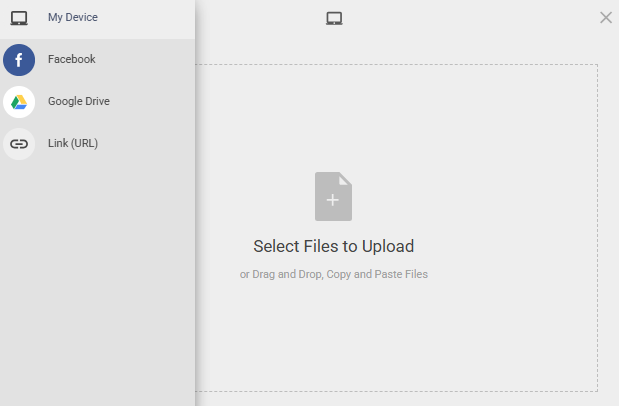
The Choose File window works similarly to the Choose Image window. It lets you upload a file from your device or pull one in from a connected cloud service.
img

An example from a demonstration event.

File Sources

SourceDescription
My DeviceUpload a file directly from your computer by selecting it or dragging it into the upload area.
FacebookConnect to your Facebook account to select a file from there.
Google DriveConnect to your Google Drive account to select a file from there.
Link (URL)Link directly to a file hosted online by entering its URL.

See also:

  • Choose Image
  • Document Preview
  • Adding And Modifying Images
  • Images and Links
  • Batch Image Upload

Last reviewed: July 2026
guide.auctria.com/redirect?id=ChooseFile
ChooseFile
/website_editor/website_content/common_element_actions/choose_file/
website_editor
website_content
common_element_actions
choose_file
Choose File
Learn how to upload or link to a file using the Choose File window.
Catalog Style
Choose Image