
Reference page for E-Tickets in Auctria.
If you have Send tickets by email to guests enabled on the Tickets dashboard, Auctria generates an E-Ticket email for each ticket sold. Guests receive an E-Ticket when their email address is associated with a ticket.
No email on file
If the ticket buyer didn't provide an email address for their guest, Auctria can't send that guest an E-Ticket.
E-Tickets Dashboard
Click through Tickets → E-Tickets from the main Auctria Dashboard to open the E-Tickets Dashboard.
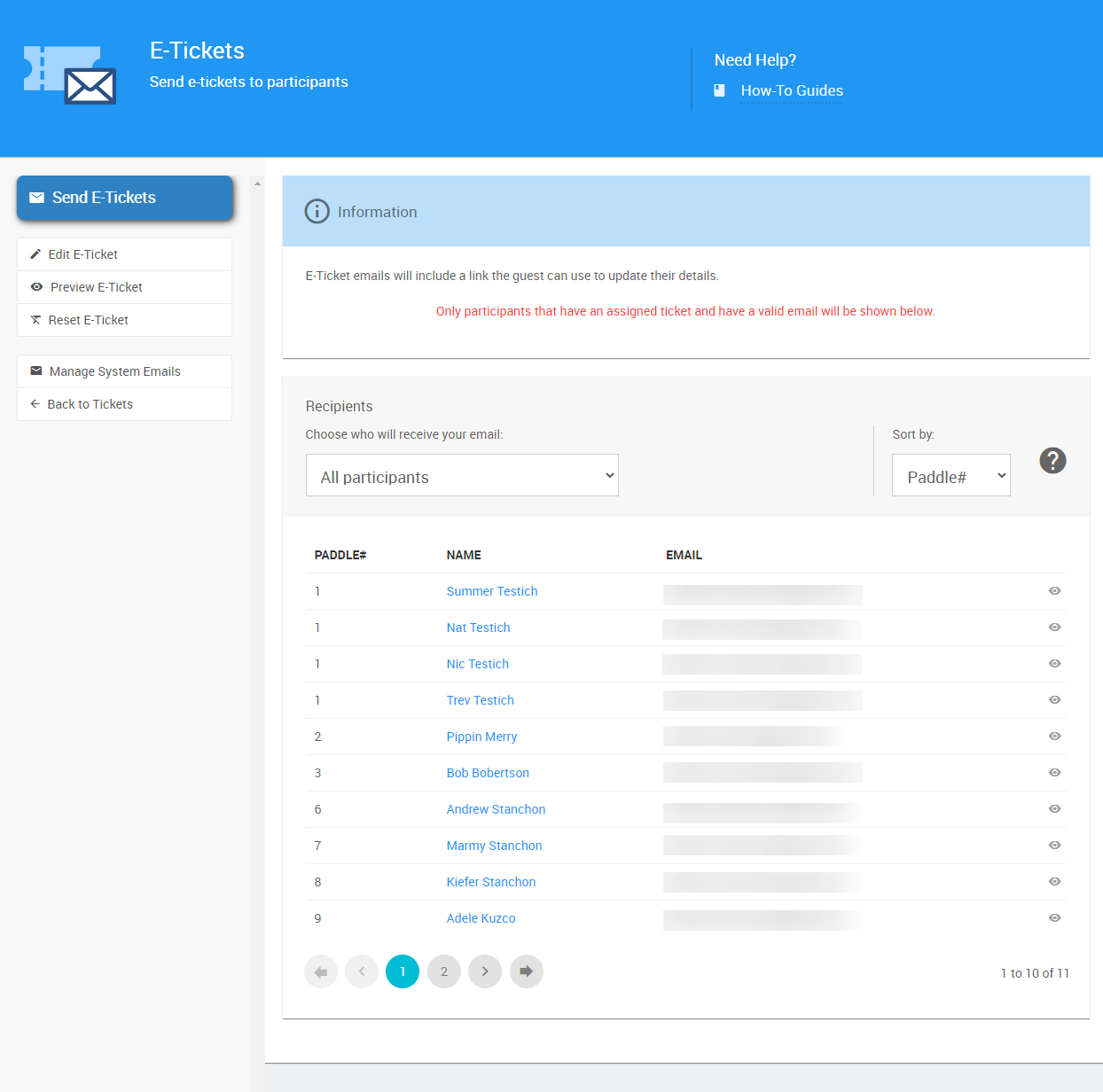
An example E-Tickets Dashboard from a demonstration event.
| Action | Description |
|---|---|
| Send E-Tickets | Sends E-Tickets to the guests on the current Recipients list, after a confirmation pop-up. |
| Edit E-Tickets | Opens the current E-Ticket in the email editor. |
| Preview E-Ticket | Shows a preview of your current saved E-Ticket, using default demonstration data. |
| Reset E-Ticket | Resets the E-Ticket to its default initial settings and layout. |
| Manage System Emails | Opens the System Emails dashboard. |
| Back to Tickets | Returns to the Tickets dashboard. |