
A brief overview of the system notifications used by Auctria.
Auctria helps you keep your participants informed every step of the way. Whether it's through email, the Mobile Bidding App, or text messages (available with a paid license), our system notifications make sure that important updates reach the right people at the right time.
Notifications at a Glance
This table shows which notifications are sent and how they're delivered.
- Email, Bidding App, and Text Message show how each notification is delivered. Text messages are optional.
- Yes (automatic) means the text message is sent automatically along with the email.
- Yes (triggered) means the text message is only sent when you trigger it.
- Trigger shows which emails you can send manually. See note 4 below the table.
| Type | Bidding App | Text Message (optional) | Trigger4 | |
|---|---|---|---|---|
| Participant Emails | ||||
| Online Registration/Purchase Receipt1 | Yes | No | No | Yes |
| Check In | Yes | No | Yes | Yes |
| Online Access | Yes | No | Yes (automatic) | Yes |
| Statement1 | Yes | No | Yes (triggered) | Yes |
| Register Credit Card Request | Yes | No | No | Yes |
| Ticket Emails | ||||
| E-Ticket2 | Yes | No | No | Yes |
| Ticket Statement (Purchaser only) | Yes | No | No | Yes |
| Online Bidding Emails | ||||
| Online Bidding: High Bid | Yes | Yes3 | No | |
| Online Bidding: Out Bid | Yes | Yes3 | Yes (automatic) | |
| Online Bidding: Raised Bid | Yes | No | No | |
| Online Bidding: Item Won (Time) | Yes | Yes3 | Yes (automatic) | |
| Online Bidding: Item Won (Buy-It-Now) | Yes | No | Yes (automatic) | |
| Item Donor Emails | ||||
| Item Donation Receipt | Yes | No | No | Yes |
| Solicited Item Receipt | Yes | No | No | |
| System Notifications | ||||
| Online Purchase/Registration Notification | Yes | No | No | |
| High Bid Notification | Yes | No | No | |
| Solicited Item Notification | Yes | No | No |
Notification Details
Online Registration/Purchase Receipts are automatically sent when participants complete a purchase or register through the website's checkout page. If someone pays a balance later using the Pay Online link, a Statement is sent instead.
If a participant updates their details using an email Update link and adds an email address, an E-Ticket is automatically sent.
Mobile Bidding App notifications are managed under Settings → Online Bidding → Notifications.
Triggered emails can be sent manually using the Trigger link. Clicking the link opens a pre-configured email page where you can filter recipients before sending.
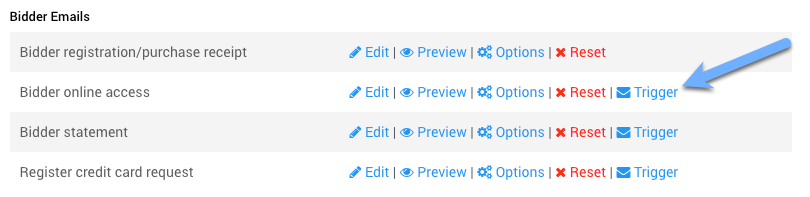
The Trigger link for a system email.
Important Notes
Text Messages Require Email Notifications
Text messages require email notifications to be enabled. If a system email is disabled, the corresponding text message is not sent.
Receipts and Statements
Online Registration/Purchase Receipts are always sent automatically and cannot be disabled. However, Statement text messages must be manually triggered.