Live Bidding type items represent items sold during a live auction event led by an auctioneer, emcee, or another member of the organization's team — whether in-person or during a Virtual Live Gala.
A few things to know about Live Bidding items:
- Bid sheets are not generated for Live Bidding items.
- They appear in the "live" section of the Printed Event Catalog.
- They can be assigned a live number to control the order in which items are auctioned off — this is separate from the
Item#. See Live Auction Ordering for more details. - Online pre-bidding is supported for Live items. If using an auctioneer, check with them first — they may want to be given any high starting bids before the live auction begins.
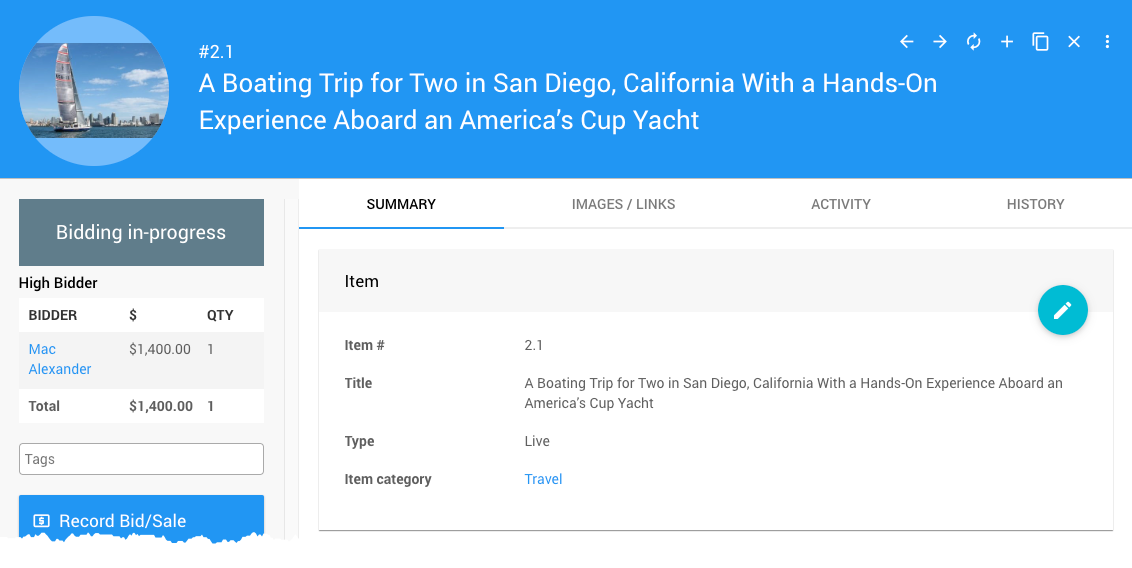
An example taken from a demonstration event.
| Field | Description |
|---|
| Item # | Auctria assigns one automatically, or you can enter your own. Item numbers can include letters and numbers, but must be unique across all items in your event. |
| Title | A short, descriptive name for the item. This appears on bid sheets, participant statements, and the event catalog. |
| Type | Controls how the item behaves. For Live Bidding items, this should be set to Live. |
| Item Category | An optional category to help organize items in your event. See Item Categories for more information. |
| Field | Description |
|---|
| Live Auction Number | Sets the order in which this item will appear during the live auction. This is separate from the item # and is used specifically for sequencing live auction items. See Live Auction Ordering for more details. |
| Field | Description |
|---|
| Description | A detailed description of the item. Use the Rewrite with AI option for assistance drafting this text. |
| Terms & Conditions | Any specific terms and conditions participants should be aware of for this item. |
| Reference Number | An optional field for any external reference number associated with the item. |
| Field | Description |
|---|
| Value | The estimated or fair market value of the item. See Pricing for more information. |
| Taxable Value | If the item's taxable value differs from its stated value, enter it here. See Taxable Value for more information. |
| Shipping Cost | Amount to charge for shipping to the winner of this item. See Shipping for more details. |
| Sales Tax Category | Sales tax category for this item. See Sales Tax Categories for more details. |
| Field | Description |
|---|
| Quantity | The number available. Defaults to 1. For multiple winners, enter the exact amount available and enable Allow multiple winners. |
| Allow multiple winners | If enabled, allows more than one bidder to win the item. |
| Max per bidder | The maximum number a single bidder can win (applies to multiples only). |
| Field | Description |
|---|
| Starting Bid | The lowest bid that will be accepted for this item. Leave blank to use the default value of $1.00. |
| Bid Increment | The minimum amount bids must increase by after the initial bid. Leave blank to use the default value of $1.00. |
| Buy It Now Price | The maximum bid amount. Once this value is reached, bidding closes immediately. |
| Reserve Price | The minimum bid required for the item to be won at auction. |
See Pricing Examples for guidance on choosing values for these fields.
| Field | Description |
|---|
| Participate in online bidding | Set to No by default. Toggle to Yes to enable online pre-bidding for this item. |
| Closing Mode | The default is Timed mode. Switch to Manual mode if an organizer needs to close bidding on this item manually. |
| Override online bidding/sales start | Sets a specific start time for online bidding on this item, overriding the default auction Online Bidding start time. |
| Override online bidding/sales end | Sets a specific end time for online bidding on this item, overriding the default auction Online Bidding end time. |
| Field | Description |
|---|
| Override online visibility start | Sets a specific time for when this item becomes visible on the auction website, overriding the event default. |
| Override online visibility end | Sets a specific time for when this item stops being visible on the auction website, overriding the event default. |
| Field | Description |
|---|
| Donated by | The person or organization that donated the item. See Item Donors Dashboard for more information. |
| Solicited by | The name of the person who approached the donor about this donation. This is an internal field only. |
| Receiptable Value | The value to show on the donor receipt, if different from the item value. Leave blank if they are the same. |
| Receipt Required | An informational checkbox only — no functionality is attached. Can be used as a reminder that the item donor requested a receipt. |
| Field | Description |
|---|
| Is basket/lot package? | Marks this item as a basket or package containing partial or for sale items. Once saved with this enabled, a Contents tab will be added to the item. |
| Is gift certificate | Allows gift certificates to be printed for this item from Auctria. |
| Is event | Marks this item as a scheduled event (e.g., a concert or dinner party). Enabling this opens the Scheduled Event panel for additional details. |
| Highlight item | Allows this item to be displayed in an Item Catalog configured to show highlighted items. |
| Exclude from website & catalog | Always excludes this item from all printed and online catalogs. |
This section appears when Is event is enabled, and is used for items that represent a scheduled event at a specific date and time.
| Field | Description |
|---|
| Event Start Time | The start time of the scheduled event. |
| Event Location | The location where the scheduled event will take place. |
| Field | Description |
|---|
| Consignment Category | A user-defined category to help organize consigned items. |
| Consignment Minimum | The minimum cost for this consignment item. |
| Consignment Maximum | The maximum cost for this consignment item. |
| Field | Description |
|---|
| Location | An informational field for noting the physical location of the item, such as a table number at an in-person event. |
| Bidsheet Closing Time | An informational field for noting the time when bidding on this item will close. |
These fields allow you to override the item description with custom text on specific forms and pages. If left blank, the item description is used by default.
| Field | Description |
|---|
| Display page text | Shown on the item's display page instead of the description. |
| Bid sheet text | Shown on the bid sheet instead of the description. |
| Certificate text | Shown on the certificate instead of the description. |
| Catalog text | Shown in the event catalog instead of the description. |
| Statement text | Shown on participant statements. |
| Ticket title | Shown in place of the item title wherever participants see their purchased tickets, such as the Ticket Hub and on e-Tickets. |
When enabled, Advanced Tagging causes the tags assigned to this item to pass through to the purchaser or winner of the item. See Where Tags Can Be Used In Auctria for more information.
A free-form internal notes field. This information is not displayed anywhere publicly and is intended for organizer use only.
