
Learn how integrated credit card processing works in Auctria.
Credit Cards Overview
Credit card processing in Auctria makes it easy to collect payments from bidders and guests during registration, checkout, and online bidding. By connecting to a supported payment processor, you can securely accept cards without handling sensitive payment data yourself.
This section will guide you through setting up credit card processing, registering cards, and managing transactions, all while keeping everything PCI-compliant and secure.
Getting Where You Need To Be
You can access Credit Card settings by navigating to Credit Cards (left sidebar, Set Up) from the main menu.
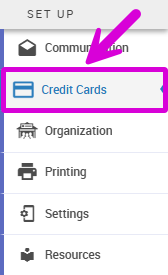
An example from a demonstration event.
From here, you'll configure your payment processor connection, manage fee handling, and access credit card reports.
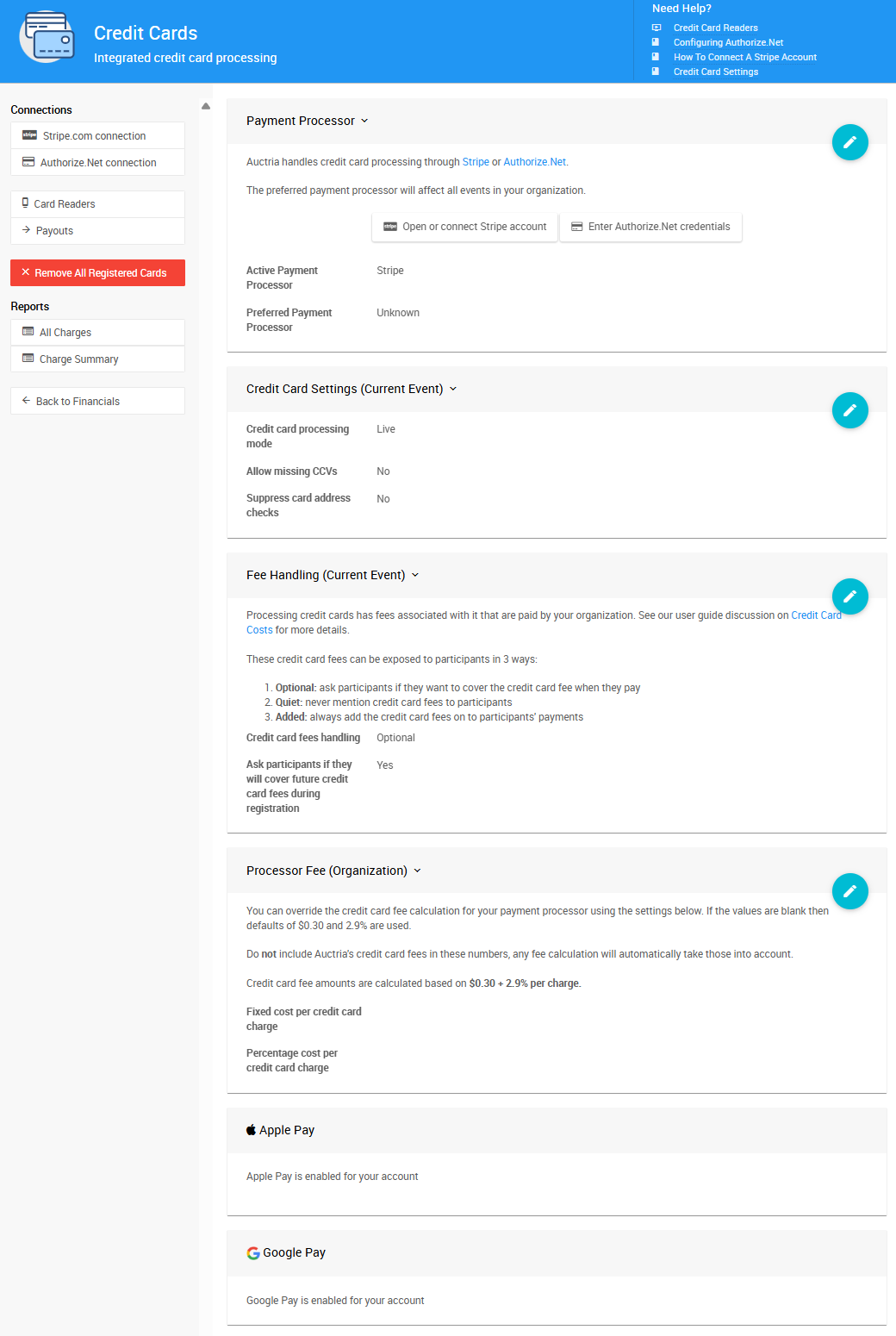
The Credit Cards page in Auctria.
What Are Credit Card Integrations?
Payment Processor Account Setup
Auctria does not manage or set up payment processor accounts for you. Your organization must create its own account directly with the payment processor.
Credit Card Integration connects your Auctria event to a payment processing service, allowing you to securely accept credit card payments. Auctria currently supports:
- Stripe.com – Recommended for ease of use and fast verification
- Authorize.Net – Best when you already have an existing merchant account
Once connected, all credit card transactions happen directly between your organization and your event participants/bidders. Auctria facilitates these transactions but has no access to your processor account settings or stored card data.
Organization Payment Processor Accounts
An organization can only connect to a single processor account at a time in Auctria.
Auctria does not support capturing raw credit card numbers. All integrated card processing is handled securely, in a PCI-compliant manner, through your connected payment processor.
→ Learn more: Connect a Stripe Account
Credit Card Features You Can Use
Once Credit Card Integration is enabled, you'll have access to several powerful features:
- Fee Handling – Pass processing fees to participants by setting fee handling to Optional or Added under Credit Cards → Fee Handling
- Registered Cards – Allow bidders to save their card for quick checkout or automatic bidding charges
- Online Payments – Accept payments during registration, checkout, or from bidder accounts
- Transaction Reports – Track all credit card charges and get detailed payment summaries
Credit Card Integration
All Credit Card features require the Credit Card Integration feature set to be enabled.
Once a credit card is entered, the original number cannot be retrieved again. However, cards can be registered to a participant and charged in the future without anyone being able to see the full number.
How Credit Cards Work in Your Event
Credit cards can be registered and charged at multiple points during your event:
- During registration – Guests can register their card when signing up (under Online Payment Options)
- At checkout – Cards can be registered for future use during the checkout process
- As a bidding requirement – You can require card registration before allowing online bids (under Online Bidding Behavior)
Whether you require guests to register credit cards depends on your audience and their expectations. Most organizers find Credit Card Integration very convenient compared to using multiple systems to process and record payments accurately.
Register Credit Cards
To register credit cards, you must have Credit Card Processing enabled.
→ Learn about: Online Payment Options
→ Or explore: Online Bidding Behavior
Credit Card Reports
The most common reports for tracking credit card activity are:
- Reports → Financial | Payments → Credit Card Charges
- Reports → Financial | Payments → Credit Card Summary
These reports provide essential information about credit card transactions from your event. You can expand on these default reports using the Choosing Columns function for more detailed analysis.
→ Learn more: Credit Card Reports »
Alternative Payment Methods
If you prefer not to use Auctria's credit card integration, you can still accept credit cards using:
- PayPal's virtual terminal or mobile payment app
- Square's mobile payments
Alternative Payments in Auctria
These are not integrations with Auctria. Transactions must be manually recorded in Auctria using the "Other Payments" option (same as cash or check).
→ See our FAQs: Can We Use PayPal? and Can We Use Square? »
→ More info: Checkout Options »