
Create a digital payment link to share with your guests.
By default, an Online Payment Link will be included with the Item Won Notification and Bidder Statements. However, there may be times when you need to send a participant another link.
Credit Card Integration Required
This requires credit card integration to be enabled.
Step 1: Get The Access Code
To manually create an Online Payment Link for a specific participant, you will need their Participant Access Code. This can be easily found in the Participant Details Summary tab.
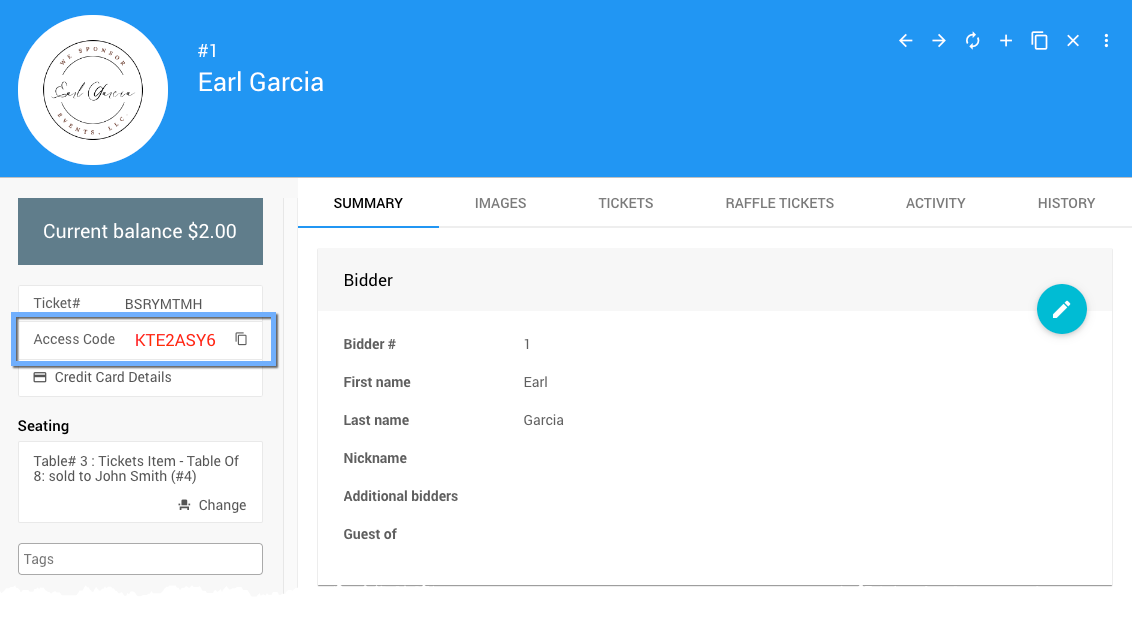
An example from a demonstration event.
Step 2: Use It In The Payment Link
An Online Payment Link URL follows the convention: http://pay.auctria.com/?CODE= + Participant_Access_Code.
Example: An Online Payment Link For "Earl Garcia"
To create an Online Payment Link for "Earl Garcia":
- use the URL
http://pay.auctria.com/?CODE=(see above); and, - use his event specific Participant Access Code:
KTE2ASY6.
Combining these two pieces of information will create http://pay.auctria.com/?CODE=KTE2ASY6 as his Online Payment Link.