
Any Paper Bidding, Live Bidding, or Online Bidding item can be set up as a fixed price item by making it a Buy It Now Only item.
Buy It Now Only items are most commonly used when selling multiples of the same item — for example, seats at a dinner party.
To configure an item as Buy It Now Only, set the following:
- Buy It Now Price and Starting Bid to the same value
- Allow multiple winners to Yes
- Quantity to the number available, or leave blank (equivalent to
0) for unlimited
For Sale vs. Buy It Now Only
While both For Sale Items and Buy It Now Only Items can be used to sell items at a fixed price, they behave differently in a few important ways.
For Sale Items are typically used for Tickets because they require immediate payment at the time of purchase. Buy It Now Only Items, on the other hand, are added directly to the participant's account balance to be paid later — either during Checkout By Organizer or via an online payment link from a Won Item Notification.
| Item Concept | For Sale Item | Buy It Now Item |
|---|---|---|
| In-Person Events | Not required first | Required first |
| Tickets | Admission to the in-person event | Admission to another event or venue (not the in-person event) |
| Participant Statements | Displays under Purchases | Displays under Won Items |
| Sponsorships | Sold prior to event | Use Donation Items during events for sponsorships |
| Raffle Tickets | To sell with Tickets | To sell during event or via mobile app |
| Online Payments | Immediate payment required | Added to participant balance; immediate payment may not be required |
A couple of other key differences to be aware of:
- Under the For Sale Items approach, participants can remove items from their cart before completing checkout.
- Under the Buy It Now Only approach, items are immediately added to the participant's balance and cannot be removed by the participant. An organizer would need to use the Remove Bid function to reverse this.
Both item types support quantity limits by setting a value in the Quantity field. Leaving it blank or entering 0 is treated as unlimited.
By default, For Sale Items are not displayed in the website Item Catalog, while Buy It Now Only Items appear in auction catalogs since they are Paper, Live, or Online type items.
Bid Sheets
For Paper Bidding type Buy It Now Only items, the bid sheet is generated as a sign-up sheet. It shows one row per available quantity, with the fixed price printed on each row.
Online Bidding
On the auction website and mobile app, participants see a Buy It Now button rather than a Bid button, and can purchase multiple quantities in a single transaction.
Buy It Now Price Acts as Maximum Bid
The Buy It Now Price acts as a maximum bid for online items. If a participant enters a higher bid amount, the system will automatically cap it at the Buy It Now Price.
Buy It Now Button Visibility
The Buy It Now button only appears for participants who are logged in, registered for the event, and after online bidding has started.
Item Closing
For single-winner Buy It Now Only items, the item closes as soon as a participant clicks Buy It Now. For items that support multiple winners, the item remains open until either the auction ends or the last available quantity is sold. In both cases, Buy It Now purchases appear as final bids in the participant's account immediately, even while the item is still open.
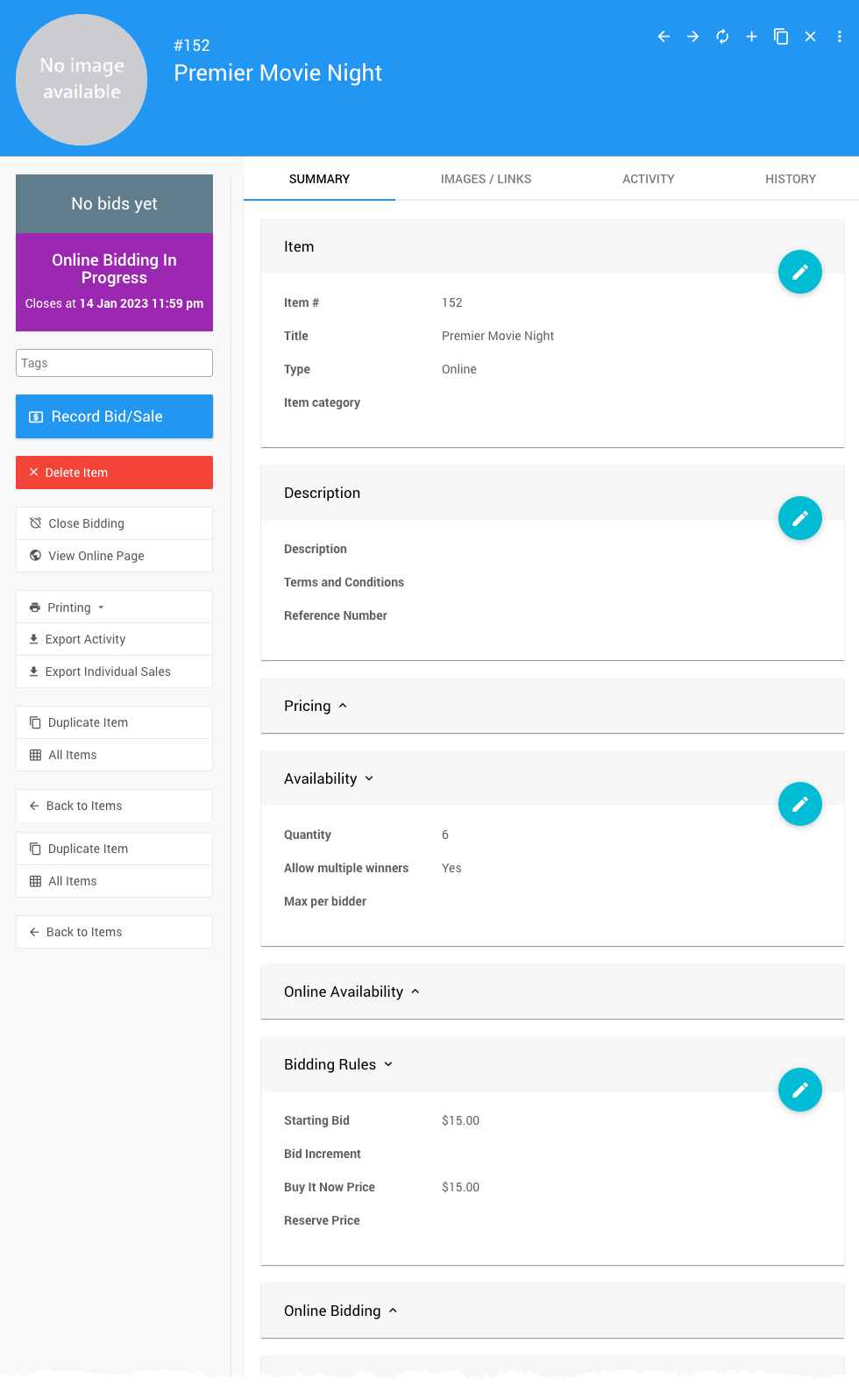
Example: Premiere Movie Night
Say you're offering six spots at a Premiere Movie Night for $15 each. Here's how you'd configure the item:
- Starting Bid = $15
- Buy It Now Price = $15
- Quantity = 6
- Allow multiple winners = Yes (enabled)
Higher Bids Are Reduced to the Buy It Now Price
The Buy It Now Price is the maximum bid value accepted for an item. If a participant enters a higher amount, their bid will be reduced to the Buy It Now Price and they will be recorded as having the winning bid.