
This page provides an introduction to Auctria's Raffles dashboard.
What Are Raffles?
Raffles are a popular way to boost engagement and raise funds. Whether you're selling golden tickets or raffling off a single big item, Auctria makes it simple to manage your raffles from start to finish, all within the Raffles Dashboard.
Creating Raffles
Open the Raffles dashboard by clicking Raffles in the left sidebar under Details.
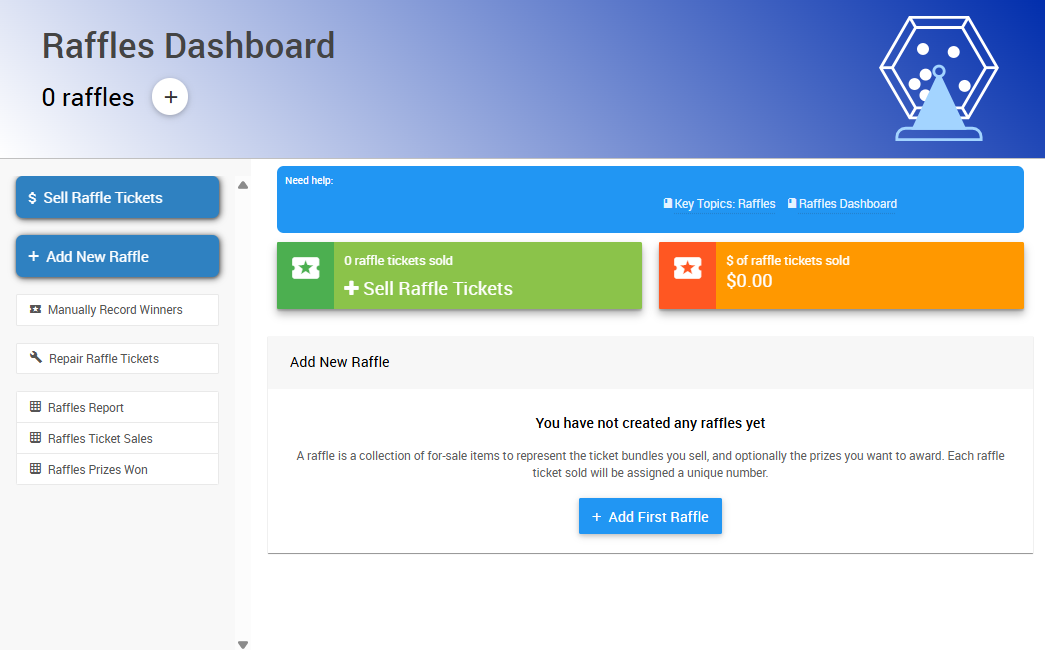
An example from a demonstration event.
If your event doesn't have a raffle yet, click Add First Raffle to create one. This opens the Add Raffle page, where you enter your raffle's information.
See Creating Raffles for step-by-step instructions.
Running Raffles
Once your raffle is set up, you can sell tickets and award prizes right from the Raffles dashboard.
Raffle Sales
| Method | Description |
|---|---|
| Online Sales | Ticket items are displayed on your event website. Buyers receive electronic tickets that are automatically tracked. |
| Admin App Sales | Volunteers sell raffle tickets onsite using the Admin App. Tickets sold this way are also tied to the buyer's account. |
Award Winners
| Method | Description |
|---|---|
| Automatically | Auctria randomly draws winners based on the number of entries. Best for fully digital raffles. |
| Manually | Draw winners yourself and record them in the dashboard. Ideal for physical tickets or in-person drawings. |
To award prizes, open your raffle from the dashboard and choose Award Winners.
Raffle Types
Auctria supports several raffle formats:
- Single Winner
- Multiple Winners
- Golden Ticket
- And more
See Running Raffles for details on running each type, selling tickets, and awarding prizes.
Get Started
- Creating Raffles — Create your first raffle.
- Add Raffle Tickets and Prizes — Add tickets and prizes to an existing raffle.
- Running Raffles — Sell tickets, award prizes, and manage raffles during your event.
- Raffle How-To Guides — Quick links to every raffle guide in one place.