
An overview of the Consignments features offered by Auctria.
What Is a Consignment?
A consignment is an item provided to your event where the consignor retains ownership until the item sells. If the item doesn't sell, it's usually returned to the consignor.
When a consigned item sells, the consignor receives compensation as agreed on before the auction. The difference between the winning bid and the amount owed to the consignor goes to your fundraiser.
Consignments typically come from a third party at no upfront cost to your organization. If the winning bid doesn't cover the item's cost or reserve bid, the item isn't sold, and you owe nothing. Your organization only incurs an expense for a consignment item after it sells.
Consignment Item Ideas
Consignments work well for items with an established inherent value, such as jewelry or artwork, where the owner (the consignor) is providing the item — for example, from a private collection or estate. A consignor may also agree to provide an item in exchange for a specific dollar amount, a percentage of the winning bid, or both.
Common examples include:
- Jewelry
- Artwork
- Vacation packages
- Sporting event tickets, such as those provided by season ticket holders
- Autographed memorabilia (sports, music, celebrity, etc.)
Consignments vs. Donations
The key difference between a consignment and an item donation is compensation. A donated item is gifted to the auction, and no compensation goes back to the donor — all proceeds go to your fundraiser. With a consignment, the consignor is compensated when the item sells.
If a potential donor isn't ready to gift an item outright, offering a consignment arrangement can be a useful alternative.
Consignment Categories
A Consignment Category defines the compensation rules for a consigned item — as a percentage of the winning bid, a percentage of the item's value, or a fixed amount. Categories are most useful when several items share the same consignment rules, since you only need to enter the rules once.
One-off items don't need a category
If you're only consigning a single item, you can skip creating a category and enter the Consignment Minimum and Consignment Maximum values directly on the item instead.
Steps
- (Optional) Review your Expense Categories setup to make tracking consignment-related expenses easier.
- (Optional, recommended for multiple items) Define a Consignment Category if several items will share the same consignment rules.
- Create a new item, or select an existing one.
- Open the item's Item Details page and expand the Consignment section.
- Select a Consignment Category from the dropdown, or manually enter values in the Consignment Minimum and Consignment Maximum fields.
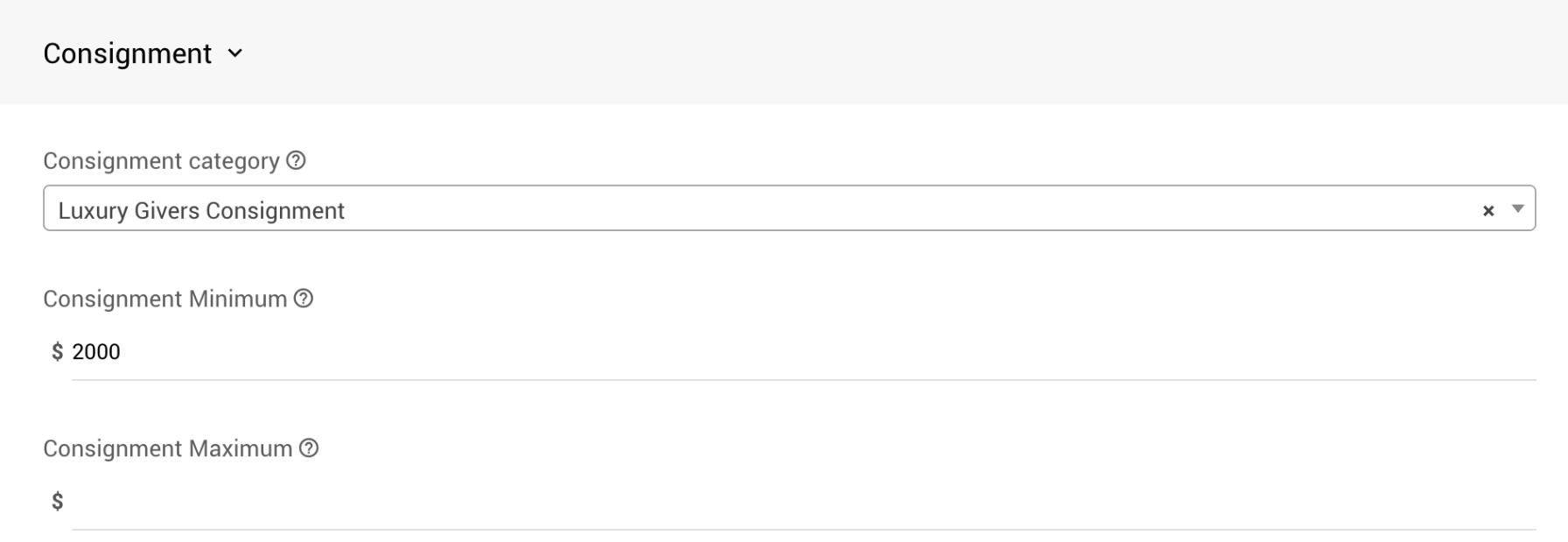
The Consignment section on the Item Details page, where you assign a Consignment Category or set Minimum/Maximum values manually.
- (Optional) Set an appropriate Reserve Price to help meet your consignment obligations.
Example Usage
Consignment Percentage Rules
A travel package uses the following category settings:
| Field | Value |
|---|---|
| Value | $1,000 |
| Percentage of Winning Bid | 50% |
| Minimum Percentage of Value | 40% |
| Maximum Percentage of Value | 80% |
| Winning Bid | Calculation | Expense |
|---|---|---|
| $2,000 | $2,000 × 50% = $1,000, which is above the maximum ($1,000 × 80% = $800) | $800 (maximum applies) |
| $1,500 | $1,500 × 50% = $750, which falls within the min/max range | $750 (percentage of winning bid applies) |
| $600 | $600 × 50% = $300, which is below the minimum ($1,000 × 40% = $400) | $400 (minimum applies) |
Fixed Consignment Value Owed
A diamond necklace valued at $250 owes the consignor $150 if it sells. You'd set:
| Field | Value |
|---|---|
| Value | $250 |
| Consignment Minimum | $150 |
| Consignment Maximum | $150 |
| Starting Bid | $160 |
The starting bid should always be greater than the amount owed to the consignor.